
The core toolkit for a forex account manager running multi-account replication comes down to three things: a locally installed EA-based trade copier for MT4, MT5, or DXTrade; a dedicated Windows VPS sized to your terminal count; and per-account lot-sizing and risk controls with automated flattening. Get those three right and the rest is configuration.
Here is the short checklist before the full breakdown:
- Local EA-based trade copier (MT4/MT5/DXTrade): copies master trades to follower accounts on the same machine, sub-0.5s locally
- Dedicated Windows VPS: always-on, dedicated cores, static IP, sized to terminal count
- Per-account risk and lot-sizing rules: daily loss limits, trailing drawdown, auto-flatten on breach
- Monitoring and alerting: disconnect alerts, daily trade reconciliation, automated flatten/lock behavior
- Broker compatibility checks: symbol suffixes, execution type, lot minimums, DLL permissions
Mt4copier’s Local Trade Copier is the leading locally installed solution in this category, active since 2010 with 3,000+ users and 491 Trustpilot reviews. A 7-day free trial is available. Past results do not guarantee future performance.
Key Takeaways
A locally installed EA-based trade copier on a dedicated Windows VPS, combined with per-account risk rules and daily reconciliation, is the minimum viable setup for reliable multi-account forex replication.
| Point | Details |
|---|---|
| Local copier is the foundation | An EA-based local copier keeps all trade data on one machine, eliminating cloud latency and IP exposure. |
| Size your VPS to terminal count | MT4 uses 300–600MB per terminal; MT5 uses 600MB–1.2GB; plan for 6–8GB RAM minimum with dedicated cores. |
| Isolate risk rules per account | Set daily loss limits and auto-flatten per follower so one breach does not affect the whole group. |
| Measure latency with timestamps | Record master signal time and slave fill time to find where delay actually lives in your stack. |
| Mt4copier covers the full stack | Local Trade Copier includes MT4, MT5, and DXTrade copying with 18 risk options and sub-0.5s execution under one subscription. |
What tools do account managers need for multi-account copying?
Each tool category solves a distinct failure mode. Skipping one creates a gap the others cannot cover.
| Category | Core function | Key selection criteria |
|---|---|---|
| Local EA-based copier | Replicates master trades to follower accounts on the same VPS | Sub-0.5s execution, per-account lot rules, cross-platform MT4/MT5/DXTrade |
| Windows VPS | Keeps terminals running 24/7 without sleep or disconnect | Dedicated cores, 6–8GB+ RAM, static IP, proximity to broker endpoint |
| Per-account risk engine | Enforces daily loss limits and auto-flatten per follower | 18+ lot/risk modes, account-level isolation, trailing drawdown |
| Monitoring and alerting | Detects copy failures, disconnects, and divergence | Email/Telegram alerts, log access, reconciliation reports |
| Broker compatibility layer | Handles symbol mapping, lot minimums, execution rules | Symbol suffix support, STP/ECN compatibility, DLL permission check |
Strategy holding period matters here. Scalpers and news traders need the lowest-jitter VPS route to the broker endpoint, even at higher cost. Swing traders running 4-hour or daily charts have more tolerance for a few extra milliseconds, so a mid-tier VPS closer to the broker’s data center (LD4 in London, NY4 in New York, TY3 in Tokyo) often delivers enough without the premium.
Pro Tip: If your strategy holds positions for hours or days, prioritize VPS uptime and dedicated cores over raw latency. If you scalp or trade news events, route stability to the broker endpoint matters more than anything else on this list.
Why local copying matters for latency and IP exposure
A local EA-based copier writes trade events to shared files or memory on the same machine where both master and slave terminals run. The signal never leaves the VPS. That means the copy layer adds near-zero network delay, and every follower account shares one IP address with the master, which matters for prop-firm traders where cloud-routed copying can trigger IP-detection flags.
Local Trade Copier operates exactly this way: the master EA writes events locally, each slave EA reads them, and orders fire without touching an external server. The practical result is sub-0.5-second local execution across all connected accounts.
Features to verify before committing to any local copier:
- 18 lot-sizing and risk options: proportional by equity, fixed lot, risk-percent per trade, and more
- Symbol mapping: handles broker suffix differences (e.g., EURUSD vs. EURUSDm)
- Reverse copy: useful for hedging setups across accounts
- Max slippage control: rejects fills beyond your threshold
- Auto-flatten on breach: closes all follower positions when a risk rule triggers
- Cross-platform support: MT4, MT5, and DXTrade cross-copying under one subscription
Mt4copier has shipped safety and execution controls specifically for prop-firm and retail traders, including account-level enforcement features that isolate each follower’s risk state. Active since 2010, 3,000+ users, 491 Trustpilot reviews. Past results do not guarantee future performance.
Pro Tip: Install separate MT4/MT5 terminal folders for each account rather than sharing one installation. Keep slave terminals lean — attach only the copier EA, no extra indicators — to cut RAM use per terminal.
How do you size and configure a Windows VPS for copy trading?
MT4 terminals with a couple of charts use roughly 300–600MB of RAM each; MT5 runs heavier at 600MB–1.2GB, and Windows Server idle consumes around 0.8–1.2GB. Add those up before you order.
For real-world copy farms, the realistic floor is 6–8GB RAM with dedicated cores. Burstable vCPU plans look cheap until a CPU spike during a fast market delays order execution across every terminal simultaneously.
Provider checklist:
- Dedicated (not burstable) CPU cores
- Static or dedicated IP for broker whitelisting
- Data center in LD4 (London), NY4 (New York), or TY3 (Tokyo) depending on your broker’s server location
- Windows Server 2016 or later with RDP access
One important note: MetaQuotes Virtual Hosting hosts one trading account per rental and disallows DLLs and remote desktop tools, limiting its suitability for multi-account DLL-based copiers, making it unsuitable for multi-account DLL-based copiers; you need a full Windows VPS.
Setup steps after provisioning: install each terminal into its own folder, schedule Windows updates outside trading hours, and disable all unnecessary GUI elements and indicators on slave terminals.
Per-account risk rules that prevent cascade failures
Configuring risk rules at the account level, not the group level, is what stops one follower’s bad day from affecting everyone else. Risk management developers consistently recommend this isolation approach: daily loss limits, trailing drawdowns, and auto-flatten per account so a single breach does not disrupt the whole group.
Per-account controls to implement:
- Daily loss limit: closes and locks the follower account when the day’s loss hits a set threshold
- Trailing drawdown: tracks peak equity and flattens when drawdown from peak exceeds the limit
- Auto-flatten on breach: immediately closes all open positions on that account only
- Account lockout: prevents new trades on the breached account until manually reset or session ends
- Session lockout: enforces prop-firm session rules (no overnight holds, no weekend positions)
Lot-sizing patterns worth knowing: proportional sizing scales lots by the follower’s equity relative to the master, which keeps risk consistent across accounts of different sizes. Risk-based sizing (constant percentage per trade) works well for funded accounts with strict drawdown caps. Fixed-lot override is the safest choice during evaluation phases where any oversizing can void the account.
For prop-firm execution controls and multi-account configuration details, test every rule trigger on a demo account before going live. Fire a trade that intentionally breaches the daily loss limit and confirm the auto-flatten fires on that account alone, not across the group.
Testing, deployment, and 24/7 monitoring checklist
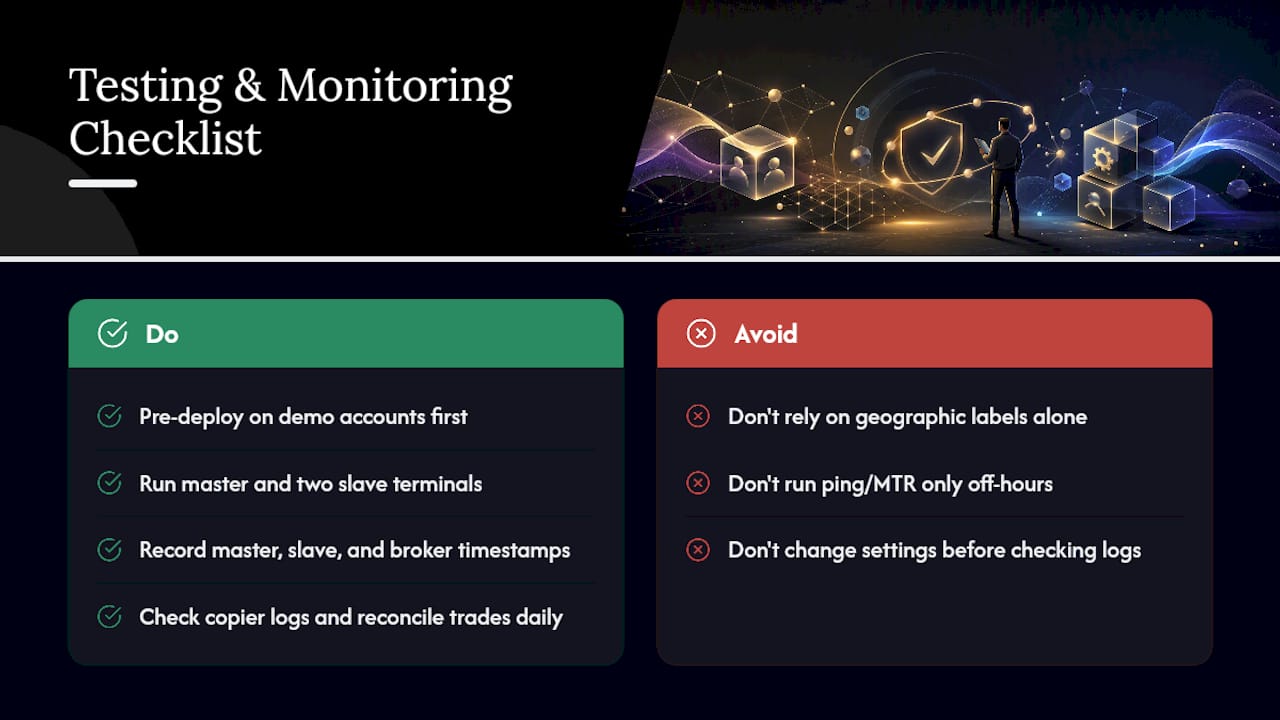
Pre-deploy on demo accounts first. Run the master and at least two slave terminals on the same VPS, open a small trade (0.01 lots), and verify open, modify, and close actions all copy correctly. Check the copier logs for timestamps on each action.
To measure copy latency accurately, record the master signal timestamp, the slave order-send time, and the broker acknowledgment and fill time. The delta between master signal and slave fill is your real copy latency. Copier log timestamps give you the most useful number if the software records them.
Route quality to the broker endpoint matters more than geographic labels. Run ping and MTR to the broker’s server during live trading sessions, not just off-hours, to catch jitter under real load.
Monitoring checklist for live operation: Check copier logs daily for copy-failed entries. Set email or Telegram alerts for terminal disconnects. Reconcile master and follower trade lists every day — count open positions and compare. Confirm auto-flatten and account-lock behavior fires correctly on breach. Verify reconnection behavior after a simulated disconnect before going live.
Pro Tip: The fastest triage step when something looks wrong is to compare master and follower trade counts. If counts match, the issue is broker execution. If they diverge, the issue is in the copy layer — check logs before touching anything else.
For a broader view of monitoring tools that pair with Local Trade Copier, the linked guide covers alerting options in more detail.
What broker and account settings break copy setups?
Broker-side issues cause more copy failures than software bugs. Check these before going live:
- Symbol suffixes: confirm the copier’s symbol mapping handles your broker’s naming (EURUSD.i, EURUSDm, etc.)
- Execution type: STP and ECN brokers handle pending orders differently; test market and pending order behavior separately
- Minimum lot size: some brokers enforce 0.1 lot minimums, which breaks proportional sizing on small follower accounts
- Margin call and closeout rules: know the broker’s margin level at which positions are force-closed
- DLL permissions: confirm the broker’s terminal settings allow DLL imports if your copier requires them
For prop-firm accounts, read the firm’s current rules before configuring anything. Position-size caps, session lockouts, and overnight hold restrictions change without notice. Set per-account overrides in the copier to match each firm’s current ruleset, and review them after any firm announcement.
Security: use a dedicated or whitelisted IP for your VPS, set strong unique passwords for Windows user accounts and RDP access, and follow the VPS and password security practices documented for trade copier setups.
How do you fix the most common copy trading failures?
| Symptom | Likely cause | Immediate fix |
|---|---|---|
| Missed trades on follower | Terminal disconnect or log gap | Check copier logs, verify terminal connection, review disconnect alerts |
| Order rejections on follower | Symbol mapping error or broker rule | Check symbol suffix config, verify lot minimums and margin |
| Slippage worse than master | VPS path jitter or overloaded terminal | Run MTR to broker endpoint, reduce indicators on slave terminals |
| CPU spike across all terminals | Overloaded VPS or burstable CPU throttle | Check Task Manager, upgrade to dedicated cores, isolate copy workload |
Fast triage rule: Always compare master and follower trade counts first. Matching counts point to a broker execution issue. Diverging counts mean the copy layer failed — open the copier logs before restarting anything.
Pro Tip: Never restart a terminal mid-trade without first confirming the account is flat or that the copier will correctly re-sync open positions on reconnect. A blind restart can leave orphaned positions on follower accounts.
For a full trade copying best practices guide, the linked resource covers reconciliation and operational discipline in more depth.
What running a copy farm actually teaches you
The operational reality of managing a copy farm is that uptime and deterministic VPS resources matter more than any software feature. A copier with every option available means nothing if the VPS throttles CPU during a fast market. The three priorities that actually determine whether a copy operation runs reliably are: guaranteed VPS resources (dedicated cores, enough RAM, no noisy neighbors), per-account risk enforcement that isolates each follower, and daily reconciliation so divergence gets caught before it compounds.
Most operators underestimate the reconciliation step. Comparing trade counts takes two minutes. Discovering a follower has been running a position the master closed three days ago takes much longer to untangle.
Three immediate priorities:
- Uptime and deterministic VPS resources: dedicated cores, sized RAM, static IP
- Per-account risk enforcement: every follower has its own daily loss limit and auto-flatten rule
- Daily reconciliation and alerts: compare trade lists, confirm alert delivery, check logs
Local Trade Copier covers the full checklist out of the box
Mt4copier’s Local Trade Copier maps directly to every item on this toolkit list. One subscription includes the MT4 copier, MT5 copier, MT4-to-DXTrade, and MT5-to-DXTrade components, with 18 lot and risk management options, sub-0.5-second local execution, symbol mapping, reverse copy, and auto-flatten controls built in.

For prop-firm traders, the on-machine execution means one IP address across all accounts and no cloud routing exposure. For account managers copying to client accounts, per-account lot scaling adjusts automatically to each follower’s balance. The installation guide walks through separate terminal folder setup and EA attachment for each account.
Active since 2010. 3,000+ users. 491 Trustpilot reviews. Start with the 7-day free trial and test on 0.01 lots before scaling. Past results do not guarantee future performance.
Sources
- Copy Trading Setup on VPS: Master and Slave Configuration | FXVPS
- Choosing VPS Hosting for Low-Latency Copy Trading
This article is general information, not a substitute for advice from a qualified financial advisor. Consult a qualified financial professional about your own circumstances before acting on anything here.
Recommended
- Local Trade Copier Updates MT4 and MT5 Versions with New Tools for Prop Firm and Retail Traders | Trade Copier for MT4 & MT5
- MT4 to MT5 copy guide: replicate trades across platforms
- Manual Trade Copying Workflow: A Step-by-Step Guide
