
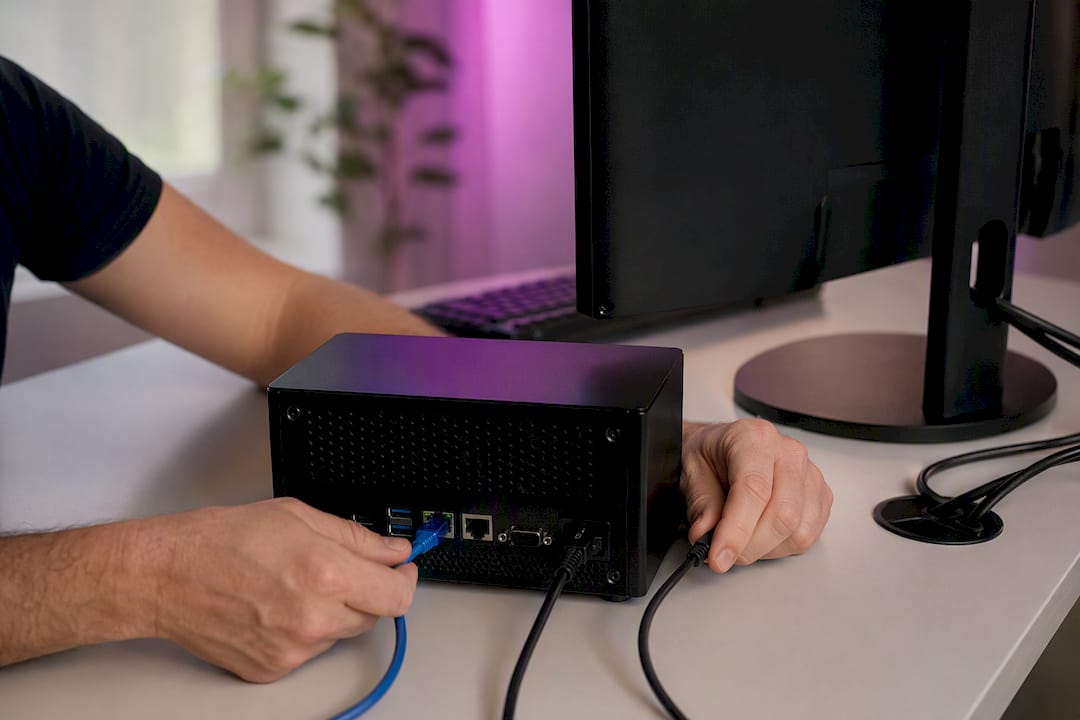
Mobile trade copying, in the sense that matters for MetaTrader users, means running trade copier software locally on a Windows PC or VPS to replicate trades instantly across MT4, MT5, and DXTrade accounts. It is not a phone app mirroring trades over the cloud. If you manage several accounts or run a licensed EA across multiple terminals, the fix is a locally installed copier, not a mobile dashboard.
- Local copiers execute in under 0.5 seconds because everything runs on one machine.
- Mt4copier’s Local Trade Copier covers MT4, MT5, and both DXTrade directions under one plan.
- A 7-day free trial lets you test the setup before committing to anything.
Key Takeaways
Local trade copying replicates trades between MT4, MT5, and DXTrade terminals on one machine in under 0.5 seconds, with VPS sizing and broker response time as the real limits on performance.
| Point | Details |
|---|---|
| Local means on-machine | The copier runs on your Windows PC or VPS, not through a mobile app or cloud relay. |
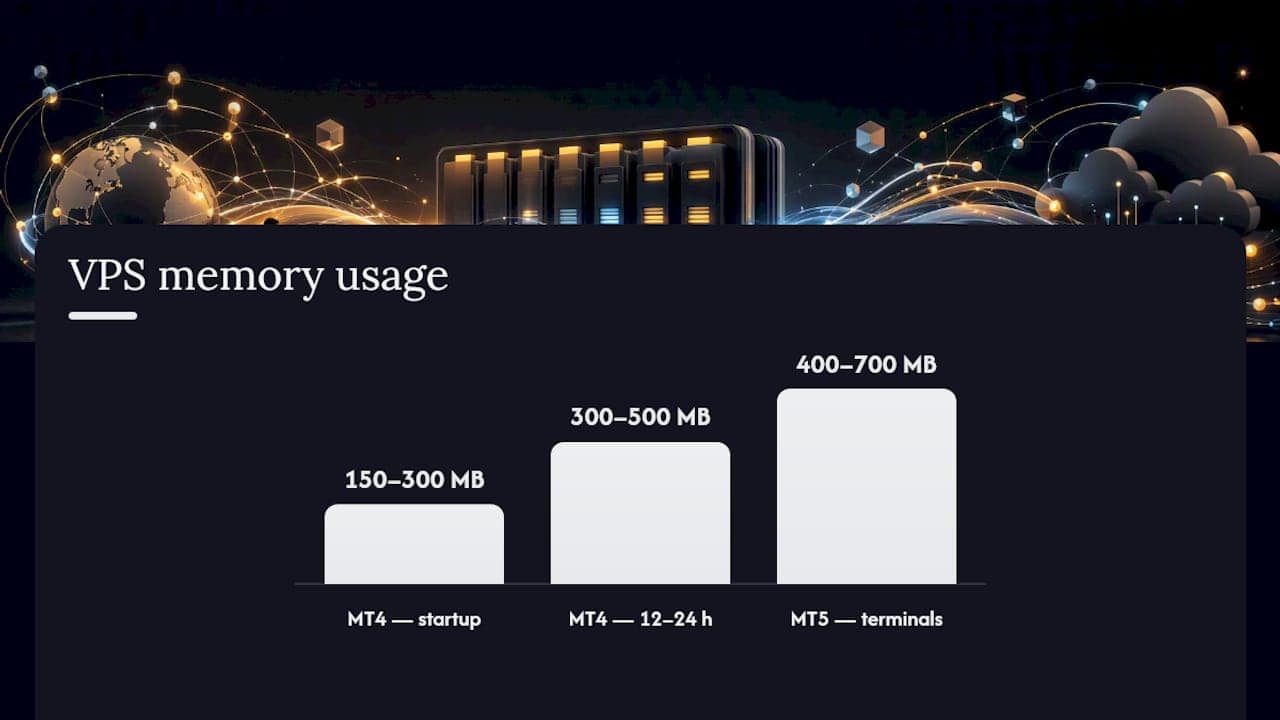
| VPS sizing decides capacity | MT4 terminals use 150 to 500 MB and MT5 terminals use 400 to 700 MB, so RAM sets your terminal ceiling. |
| Broker response is the real bottleneck | Sub-second local sync doesn’t change how fast your broker’s server fills the order. |
| Test on demo first | Small trades on demo accounts catch symbol mismatches and account-role errors before they cost money. |
| Mt4copier covers the full setup | A 7-day free trial includes MT4, MT5, MT4-to-DXTrade, and MT5-to-DXTrade under one plan. |
What Local Trade Copying Actually Means
Local trade copying uses inter-process communication or shared files on a single Windows machine to move trade instructions from a master terminal to one or more client terminals. Cloud or mobile mirroring services route that same trade data through a third-party server, adding a hop your broker never sees on a purely local setup. That routing difference matters if you are a prop-firm trader worried about IP-based detection, since a local copier keeps everything on one machine and one IP address.
This guide covers exactly one job: replicating trades between terminals running on the same PC or VPS. It does not cover mobile app mirroring between phones, which is a different setup with different tradeoffs.
- Supported platforms: MT4, MT5, and DXTrade (both MT4-to-DXTrade and MT5-to-DXTrade)
- Required environment: a Windows PC or a standard Windows VPS, not a mobile OS
- Core mechanism: local file sharing or DLL-based messaging between terminal instances
Who Actually Needs This Setup
Local trade copying earns its place with a specific kind of trader. Retail traders juggling several personal accounts, or running many EAs at once, benefit most directly. Independent account managers and prop-firm traders who need execution to stay on one machine, avoiding any cloud relay, are the clearest fit.
- Retail traders managing multiple personal or funded accounts from one terminal setup
- Account managers copying a single strategy to several client accounts
- Prop-firm traders who need on-machine execution instead of cloud IP routing
- EA users replicating one licensed strategy across multiple terminals
If you want a mobile-first dashboard you can check from a coffee shop, or you’re relying on a provider’s hosted redundancy instead of your own infrastructure, a local copier is the wrong tool for that specific need.
What Do You Need Before You Install a Local Copier?
Get the prerequisites right before you touch installation files. Skipping this step is where most setup headaches start.
1. Confirm your machine type. You need a Windows PC or a standard Windows VPS. MQL5’s own VPS service will not work, because it does not support the shared-memory and DLL-based communication local copiers depend on.
2. Install one MT4 or MT5 terminal per account. Never run two accounts inside one terminal instance. Each account gets its own installation from your broker.
3. Size your VPS correctly. MT4 terminals use 150–300 MB at startup and can climb to 300–500 MB after 12 to 24 hours; MT5 terminals run heavier, at 400–700 MB.
4. Enable the right permissions. Turn on “Allow DLL imports” both globally in terminal options and on the individual EA properties, plus “Allow live trading” on every chart running the copier EA.
5. Plan your account roles and symbol mapping. Note which account number is the transmitter (master) and which are receivers (clients), and check for symbol suffix mismatches between brokers before you go live.
6. Test on demo accounts first, using Mt4copier’s 7-day free trial to confirm behavior before any real capital touches the setup.
Pro Tip: CPU clock speed matters more than core count here, since MetaTrader is mostly single-threaded. A 4-core CPU running at 3.0 GHz will outperform an 8-core chip running at 2.2 GHz for terminal-heavy setups.
How Fast Is Local Trade Copying, Really?
Local copiers sync master and client terminals in under 0.5 seconds under normal conditions, with internal replication often clocking under 1 millisecond and default sync intervals around 400 milliseconds. That number describes the copier’s own internal handoff, not the full trip your order takes to reach the market.
Broker server response is the part you don’t control, and it’s usually the slowest link in the chain. During normal conditions it’s fast; during volatile news events it can stretch to much longer delays. No copier, local or cloud, changes what happens after your order leaves the terminal. Past results do not guarantee future performance.
There’s also a structural tradeoff worth understanding. A local setup adds two internet round trips per copy (the leader’s report traveling to your PC, then the follower’s order traveling back to the broker), so leader-to-follower delays commonly land in the 30 to 160+ millisecond range depending on geography, compared with 3 to 8 milliseconds for a cloud copier colocated inside the broker’s own datacenter. If your priority is avoiding cloud routing entirely, that tradeoff is the cost of doing it locally.
- VPS RAM is your hard ceiling on how many terminals you can safely run at once.
- Storage matters too: use an SSD, since slow disk I/O can back up the copier’s message queue.
- Push sync intervals faster than 400 milliseconds only after confirming your VPS handles the added CPU load.
Setting Up Local Trade Copier Step by Step
The full walkthrough with screenshots lives in Mt4copier’s installation guide, but here’s the sequence in plain terms.
- Install a separate MT4 or MT5 terminal for every account involved, using your broker’s own installer for each one.
- Purchase and install the Local Trade Copier EA, following the standard MQL5 install flow, then attach it to a chart on every terminal.
- On the master account’s chart, set the EA to transmitter mode. On every client terminal, set it to receiver mode, and enter the correct account numbers on each side.
- Configure lot sizing (fixed, scaled to balance, or one of the other options), fix any symbol suffix mismatches, and set your emergency account protection threshold.
- Confirm “Allow DLL imports” and “Allow live trading” are both checked, on the terminal level and the EA level.
- Place a small test trade on the master demo account and confirm it appears correctly on every client terminal before scaling up.
Pro Tip: Watch your VPS resource monitor for the first hour after setup. A terminal that’s leaking memory shows up fast, and it’s much cheaper to catch during testing than during a live session.
Fixing the Most Common Copying Failures
Most copying problems trace back to one of five causes, and you can usually diagnose which one in a few minutes.
- Trades not copying at all: check that “Allow DLL imports” is enabled both globally and on the specific EA. This is the single most common install mistake.
- “Symbol not found” errors: open Market Watch on the receiver terminal and confirm the symbol exists with the correct broker suffix.
- Copier ignoring commands: verify you set transmitter and receiver roles correctly, and that you’re not using an investor (read-only) password on a receiver account.
- Terminals slowing down over hours: this is usually VPS memory pressure from terminal count exceeding your RAM tier. Restart terminals on a schedule if you’re near your VPS’s ceiling.
- Orders rejected on the broker side: US-regulated accounts often run FIFO rules that block certain hedge or partial-close orders regardless of what the copier sends.
Pro Tip: Run every fix on a demo account first. Testing small trades before going live catches symbol mismatches and account-role errors that would otherwise cost you real money to discover.
Why Trust This Setup Guide
This guide draws on documented installation procedures from the MQL5 Local Trade Copier install guide and Mt4copier’s own product history. Mt4copier’s Local Trade Copier has been active since 2010, with more than 3,000 users and 491 Trustpilot reviews on record.
A copier that’s been iterated on since 2010, across MT4, MT5, and now DXTrade in both directions, has already run into most of the edge cases a new setup will hit. That history is why the installation and troubleshooting docs cover specific failure modes instead of generic advice.
- Platforms supported: MT4, MT5, MT4-to-DXTrade, and MT5-to-DXTrade, all under one plan
- Execution: under 0.5 seconds locally, with 18 lot sizing and risk management options
- Resources: an installation guide, a demo video, and a 7-day free trial for hands-on testing
What Most Setup Guides Get Wrong
Most advice on this topic treats “faster copying” as the goal and pushes readers toward shaving milliseconds off sync intervals. That’s backwards. Your copier’s internal handoff is already fast enough that it stops being your bottleneck almost immediately. The broker’s own server response time, which no software on your end can touch, decides your real-world fill speed far more than any tweak to polling frequency.
The conventional advice also underweights VPS sizing until something breaks. Terminal memory creep is predictable and preventable, yet plenty of traders discover their RAM ceiling during a live session instead of during setup. Size the VPS for your terminal count first, and resist the urge to run copy intervals below 400 milliseconds until you’ve confirmed the machine handles the load without strain.
If you take one thing from this guide, prioritize getting the account roles, symbol mapping, and DLL permissions correct before you worry about speed at all. A copier that’s correctly configured and slightly conservative beats one that’s fast and misconfigured, every time.
— Rimantas
Ready to Test Local Trade Copying Yourself
Mt4copier is the direct route to a working local setup, not a theory of one. The 7-day free trial covers every component discussed here: MT4, MT5, MT4-to-DXTrade, and MT5-to-DXTrade, all under a single plan with no separate purchases for each platform pair.

Before going live, walk through the installation guide and watch the demo video to see transmitter and receiver roles configured in real time. The software includes emergency account protection settings you can tune during setup, and every account role, lot-sizing option, and symbol mapping choice is testable on a demo account before any real capital is involved. Start the trial, connect two demo terminals, and confirm the replication behaves the way this guide describes before you touch a live account.
Sources
- Local Trade Copier: Technical Guide to Latency and VPS
- Local Trade Copier EA MT4/5 Installation & User Guide
- Copy Trading Setup on VPS: Master and Slave Configuration | FXVPS
- Local vs Cloud Trade Copier: Data Flow and Latency Analysis | FutuCopy
Recommended
- Local Trading Server Advantages for MT4/MT5/DXTrade Users
- Local Trade Copier installation on MT4 (old version)
