

TL;DR:
- MetaTrader synchronization primarily involves real-time trade copying between master and client accounts using Expert Advisors.
- Local trade copiers offer faster execution compared to cloud solutions, typically well under 1 second under normal market conditions, with minimal internet dependency.
- Proper setup and active monitoring are crucial to prevent silent failures, symbol mismatches, and drift over time.
Most traders who search for “MetaTrader synchronization” are actually looking for something very specific: a reliable way to copy trades across multiple accounts without manually re-entering every position. Yet the term itself is vague enough to mean different things in different contexts, from chart template syncing to journal data alignment. That ambiguity causes real problems when you’re trying to build a working multi-account setup. This guide cuts through the noise. You’ll learn exactly what MetaTrader synchronization means for multi-account traders, how local trade copying works under the hood, what performance benchmarks to expect, and the pitfalls that silently kill even well-configured setups.
Key Takeaways
| Point | Details |
|---|---|
| Local copying is key | MetaTrader synchronization for multi-account traders is all about efficient, local trade copying using EAs. |
| Speed beats cloud | Local setup provides faster execution than cloud-based solutions, which is vital for accurate trade mirroring. |
| Testing is essential | Always test pending order copying and check account compatibility to avoid costly synchronization errors. |
| No set-and-forget | Even the best systems require continual monitoring and proper setup for reliable results. |
Defining MetaTrader synchronization: More than just syncing data
The word “synchronization” shows up in MetaTrader in several places, and that creates genuine confusion. When you log into MT5 and see a synchronization status bar, it refers to account data being pulled from your broker’s server: your balance, open positions, history, and chart data. That kind of syncing is automatic and has nothing to do with copying trades between accounts.
For multi-account traders, synchronization means something else entirely. It means replicating trade actions from one master account to one or more client accounts in real time. As the EA-Coder setup guide explains, this type of synchronization primarily involves local trade copying using Expert Advisors (EAs) that replicate trades from a master account to slave/client accounts running on the same machine or VPS.
Here’s what this kind of synchronization actually covers:
- Trade opening: When the master opens a position, client accounts mirror it instantly
- Modification syncing: Stop loss and take profit changes on the master propagate to all slaves
- Trade closing: Partial or full closes on the master trigger matching closes on clients
- Lot scaling: Each client account can receive a proportional or fixed lot size, independent of the master
What synchronization does NOT cover by default: chart layouts, indicator settings, journal notes, or account preferences. Those are separate MT4/MT5 features that have nothing to do with trade copying.
In practice, each client account functions as an execution node, not a copy of the master’s interface. The goal is mirrored trade execution, not identical terminal configuration.
You can watch a MetaTrader copier demo to see this distinction in action. The reason local synchronization matters for risk management is simple: when you’re managing multiple funded accounts or client portfolios, manual re-entry introduces human error, delay, and inconsistency. Local EA-based copying eliminates all three. Review a full Local Trade Copier installation walkthrough to understand how quickly this can be deployed.
For a broader view of how MT4/MT5 copy trade setup works across platforms, the technical architecture is consistent: one source, multiple destinations, all running on the same machine.
How local MetaTrader trade synchronization works
Understanding the mechanics removes a lot of anxiety about whether local copying actually works. The process is straightforward once you see it clearly.

Two laptops synchronizing MetaTrader platforms
Trade copier mechanics involve installing separate MT4/MT5 terminals for each account, attaching a Server/Master EA to the source account to monitor and broadcast trade events, and attaching Client/Slave EAs on destination accounts to receive and execute those events locally via shared files or direct communication, with no internet dependency.
Here’s the step-by-step flow of a single trade synchronization event:
- Master EA detects a trade event (new open, modification, or close) on the source account
- Trade details are packaged (symbol, order type, lot size, entry price, SL/TP) and written to a shared file or memory object
- Slave EAs poll for new data at intervals as short as 50ms
- Each slave validates the signal against its own configuration (filters, lot scaling rules, symbol mapping)
- The slave EA executes the matching order on its assigned account via MetaTrader’s native order functions
Slave EAs poll for new data at configurable intervals — typically as short as 50ms — making the entire loop fast and self-contained within the local environment.
This local loop is why the speed is so different from cloud-based solutions. No packet needs to leave your machine. There’s no API handshake with an external server. Everything happens within the same Windows environment.
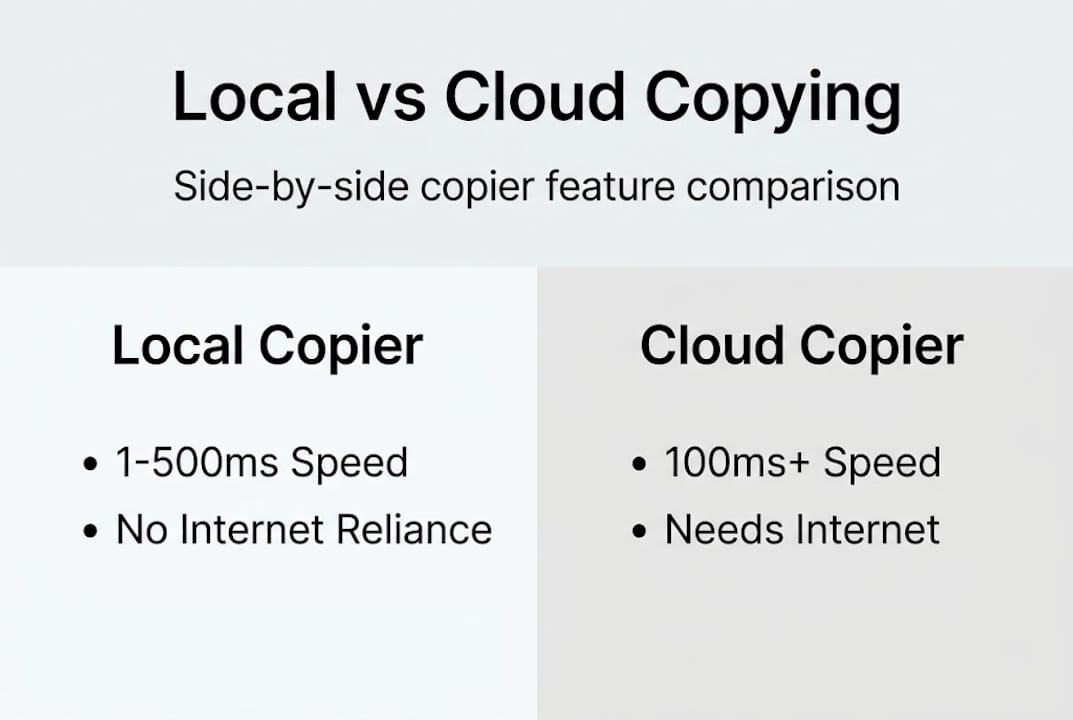
Infographic comparing local and cloud trade copiers
| Feature | Local copier | Cloud copier |
|---|---|---|
| Execution speed | 1ms to 500ms | 100ms to 500ms+ |
| Internet dependency | None | Required |
| Data privacy | On-machine only | External servers |
| Prop firm IP risk | None | Potentially flagged |
| Setup complexity | Moderate | Low to moderate |
You can configure selectively copying trades to specific accounts, which is useful when you don’t want every client account to receive every signal. For setups involving copying from one master to multiple clients, the architecture scales without additional software layers.
For more details about EA-driven copying, the EA-Coder setup guide covers how local file-based systems handle trade event communication end-to-end.
Pro Tip: Before going live, run your entire setup with pending orders only for 48 hours. This stress-tests the communication channel between master and slave EAs without risking real capital on execution gaps.
Understanding speed, reliability, and the limits of synchronization
Speed is where local synchronization earns its reputation. Local copier benchmarks show typical execution in under 1 second, often between 1ms and 100ms, with VPS latency around 5 to 10ms. Cloud-based alternatives, by contrast, commonly add 100 to 500ms of delay before a trade reaches the destination account.
That gap matters most during fast market conditions: news events, London open volatility, or sudden liquidity shifts. A 400ms delay might mean a different fill price. Over hundreds of trades, that adds up to meaningful slippage.
However, speed is only part of the reliability story. Results are rarely identical across accounts due to broker spreads, latency differences, and contract specification variations. You should treat any synchronization system as an execution environment that needs active monitoring, not a passive mirror.
| Metric | Local VPS setup | Local PC setup | Cloud solution |
|---|---|---|---|
| Typical execution | 5 to 10ms | 1 to 50ms | 100 to 500ms |
| Uptime reliability | Very high | PC-dependent | Provider-dependent |
| Slippage risk | Low | Low to moderate | Moderate to high |
| Prop firm safety | Strong | Strong | Variable |
Three specific areas where synchronization breaks down even in fast setups:
Symbol mapping gaps: If your master trades EURUSD but your broker appends suffixes (EURUSDm, EURUSD.raw), the slave EA won’t recognize the symbol without manual mapping configuration.
Netting vs hedging accounts: MT5 supports both account types, and they handle simultaneous long/short positions differently. A hedging master sending signals to a netting slave can produce unexpected results.
Drift accumulation: Over time, small differences in fill prices, partial closes, and swap calculations cause master and slave accounts to diverge. Without regular comparison, you won’t notice until the gap is significant.
Explore fastest MetaTrader copier options if execution speed is your primary constraint. For setups focused on trade copying on MT5, MT5-specific account type handling requires extra attention during configuration. The LTC features page documents the netting account constraint and recommended workarounds.
Pro Tip: Set up a weekly review where you compare master and slave PnL line by line. Even a 2% divergence over a month signals a configuration issue worth investigating before it compounds.
Common pitfalls, edge cases, and advanced tips for MetaTrader synchronization
Most synchronization failures aren’t caused by buggy software. They come from configuration oversights that seem minor during testing but cause real problems in live trading.
Common configuration gaps include: symbol mismatches requiring mapping (such as EURUSD to EURUSDm), netting versus hedging account differences in MT5 creating execution conflicts, slippage and re-quotes not syncing between accounts, and offline slave terminals requiring properly configured alerts.
Before you go live, check every item on this list:
- Symbol mapping: Confirm every symbol your master trades has a corresponding mapping rule for each slave broker
- Account type alignment: Verify whether each slave account is hedging or netting before attaching the EA
- Lot size rules: Test each client account’s lot scaling with a demo trade to confirm the math
- EA auto-trading permissions: Ensure MetaTrader’s “AutoTrading” button is enabled on all terminals
- VPS uptime monitoring: Set up external alerts if your VPS goes offline, even briefly
- Session overlap behavior: Know how your copier handles the Friday close and Sunday open gap
Beyond configuration checklists, the bigger threat is invisible. Silent failures are the most dangerous aspect of any synchronization setup. The master can trade all week while a crashed slave EA goes undetected, resulting in a drawdown that compounds before the gap is noticed.
Advanced users can also leverage filter tools to limit which trades get copied. Time-of-day filters prevent signals from copying during low-liquidity periods. Magic number filters let you copy only trades from specific EAs on the master while ignoring manual trades.
If your setup involves adding new masters to a copier, the configuration process is more involved than most traders expect and deserves a dedicated test phase. Review copier safety improvements for prop firm and retail traders to understand how alert systems and redundancy layers reduce silent failure risk.
For MT5-specific issues, the LTC features page documents platform-level behavior that affects how EAs interact with order management on netting accounts.
Pro Tip: Configure your slave terminals to send you an email or push notification if the EA goes offline for more than 5 minutes. This one setting has saved traders from multi-day synchronization gaps.
Our perspective: What most traders miss about MetaTrader synchronization
Here’s the uncomfortable truth: most traders who set up MetaTrader synchronization treat it like installing a printer. Plug it in, confirm it prints, move on. That mindset is what causes the failures that don’t show up until weeks later.
No synchronization system is set-and-forget, regardless of how well-configured it is. Brokers change contract specs. VPS providers update their infrastructure. EA compatibility shifts with MetaTrader platform updates. Each of these can introduce silent drift that you won’t catch without active monitoring.
The second thing most traders underestimate is risk amplification. Copying a flawed strategy to four accounts doesn’t just multiply the profit potential. It multiplies every mistake. A bad entry on the master becomes four bad entries simultaneously. This is why trade copying best practices emphasize strategy validation before scaling, not after.
The real benefit of synchronization is operational efficiency, specifically eliminating the manual workload of managing multiple terminals. But efficiency only pays off when the underlying strategy is sound and someone is watching the system. Expert oversight is never optional.
Next steps: Simplify your account management with trade copier solutions
Understanding MetaTrader synchronization is one thing. Having the right tools to implement it reliably is another.
Local Trade Copier handles the full workflow: MT4-to-MT4, MT5-to-MT5, and cross-platform copying, all running locally on your Windows machine or VPS with execution in 1 second or faster under normal market conditions. The installation guide walks you through the complete setup process, and the fastest copier features page details every performance configuration available. If you manage funded or prop firm accounts, the prop trading multi-account guide covers the specific setup considerations that matter for those environments. Start with the 7-day free trial and build your synchronized setup with confidence.
Frequently asked questions
What exactly does MetaTrader synchronization do for multi-account traders?
MetaTrader synchronization lets you copy trades locally from a master account to client accounts using EAs, ensuring mirrored execution with minimal delay across all connected terminals.
Is local synchronization really faster than cloud-based copying solutions?
Yes. Local copiers execute trades in under 1 second and often in just 1 to 50ms, while cloud-based solutions typically add 100 to 500ms of latency before a trade reaches the destination account.
What should I check if my synchronization setup isn’t copying trades correctly?
Start with symbol mapping and account type differences (hedging vs netting in MT5), then verify EA configuration, auto-trading permissions, and VPS or server connectivity for each terminal.
Does MetaTrader synchronization copy open trades, pending orders, or both?
Depending on your copier settings, synchronization supports both open market orders and pending orders, along with SL/TP modifications and lot scaling across MT4 and MT5 accounts.
Recommended
- How to Copy Trades Between Two or More MT5 Trading Accounts
- Copy Forex trades from one MT4 master into 3x MT4 clients
- How To Copy Trades From Selected MetaTrader 4 Master Accounts
- Copy Open Trades From Master MT4 Account
