

TL;DR:
Manual trade copying across accounts causes delays and errors, undermining performance and risk control. Automated account management systems like PAMM, MAM, and trade copiers enable fast, precise, and customizable trade replication tailored to each account’s needs. Choosing local or VPS-based execution architectures is critical for minimizing latency, ensuring consistent fills, and maintaining a competitive edge in fast-moving markets.
If you’re manually copying trades across multiple accounts, you’re introducing execution gaps that compound over time. Every second spent re-entering orders is a second where price moves, fills diverge, and risk alignment drifts. For independent account managers and multi-account traders, manual replication isn’t just inefficient — it’s a performance liability. Account management frameworks exist precisely to eliminate these gaps, automate replication, and give you precise control over every account simultaneously.
Key Takeaways
| Point | Details |
|---|---|
| Automation eliminates mistakes | With account management, trades execute across multiple accounts instantly, minimizing manual errors. |
| Speed protects profits | Fast replication reduces slippage and missed trades—key for active and high-frequency strategies. |
| Custom risk for each client | Advanced models let you match allocation and risk to individual account needs instead of a single approach. |
| Cross-broker setups require care | Replicating trades across platforms demands precise mapping to prevent errors and ensure compliance. |
| Your architecture matters | Choosing local, VPS, or cloud trade copying impacts speed, reliability, and your overall trading edge. |
What is account management in forex trading?
Account management in forex means a single manager or trader controls and executes decisions across multiple accounts without manually repeating every action. Instead of logging into each terminal and entering the same trade by hand, the manager places one order and the system replicates it across all linked accounts automatically. This is the core concept behind what many in the industry call optimize multi-account trading.
The two dominant structures for this are PAMM (Percentage Allocation Management Module) and MAM (Multi-Account Manager). Both rely on master-sub account architecture, but they handle allocations differently. In a PAMM model, investor funds are pooled together, and profits or losses are distributed proportionally. In a MAM model, each sub-account retains its own balance and can receive individually configured lot sizes or risk levels.
As detailed in a complete guide to managed account models, use of account management enables a manager to execute one trading decision and have it automatically allocated and replicated across multiple investor accounts, typically via master-sub-account structures such as PAMM or MAM — or via trade copier workflows. This automation is what separates true account management from simply being organized about manual copying.
Beyond PAMM and MAM, trade copier software represents a third model. Rather than requiring broker-level infrastructure, a copier runs locally or on a VPS and pushes trade signals from one terminal to others. This makes it accessible for independent traders managing their own set of accounts. You can explore the trade copier basics to understand where this model fits.
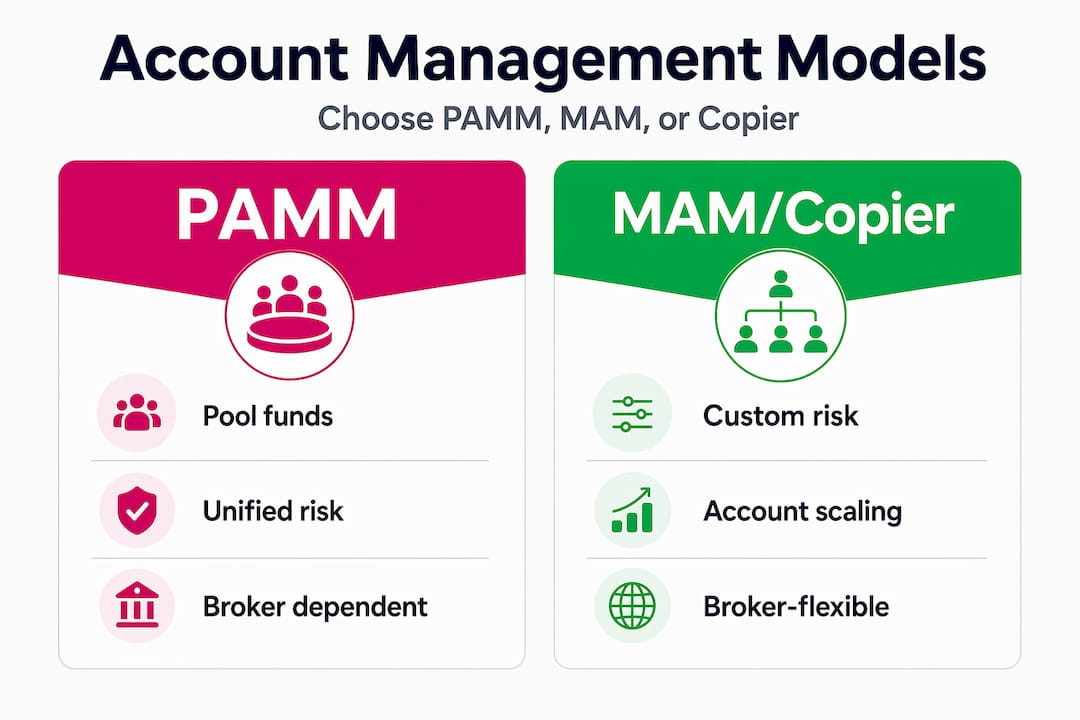
Infographic comparing PAMM and MAM copier models
Here’s a quick comparison to clarify which structure fits which scenario:
| Structure | Pooling model | Per-account risk control | Broker dependency | Best for |
|---|---|---|---|---|
| PAMM | Yes | No | High | Fund managers with similar-profile investors |
| MAM | No | Yes | High | Managers with mixed investor risk profiles |
| Trade copier | No | Yes | Low | Independent traders, prop firm accounts |
Understanding types of trading accounts at the broker level also matters here — account type restrictions can affect which management model you can implement.
Pro Tip: If your clients have different risk tolerances or account sizes, MAM or a trade copier with per-account lot scaling will serve you far better than a pooled PAMM structure.
Key advantages: Efficiency, speed, and error reduction
Speed is not a luxury in multi-account trading. It is infrastructure. When you execute a trade manually across five accounts, the first fill might come at 1.0850 and the last at 1.0853. That three-pip spread across entries creates inconsistency in your results and undermines your position-sizing math. Multiply that across dozens of trades per week and you’re looking at a measurable drag on performance.

Fast-paced multi-account forex trading scene
According to trade copier latency benchmarks, a major operational edge of multi-account trade replication is execution speed and latency control, because even small delays can translate into slippage and missed outcomes — especially at higher trade frequencies or during volatile news periods. This is why trade copying execution speed is treated as a first-order concern rather than an afterthought.
Here’s a practical breakdown of how latency affects outcomes:
| Latency range | Risk level | Likely impact |
|---|---|---|
| Under 0.5 seconds | Low | Near-identical fills across accounts |
| 0.5 to 2 seconds | Medium | Minor divergence in entry price, manageable |
| 2 to 5 seconds | High | Visible slippage, inconsistent lot sizing |
| Over 5 seconds | Critical | Missed trades, opposite fills during volatility |
The benefits of eliminating manual entry go beyond just speed. Consider these operational advantages:
- No transcription errors. Typing the wrong lot size or clicking the wrong direction under pressure is a real and costly mistake. Automation removes that variable entirely.
- Simultaneous execution. All accounts receive the trade at the same moment, which means your position sizing math stays consistent across the board.
- Audit trail. Automated systems log every trade, which is critical if you’re managing client money and need to demonstrate execution consistency.
- Scalability. You can go from managing 3 accounts to 30 without changing your workflow. The system scales; your time doesn’t.
As covered in the benefits of account management, automated replication also makes it easier to recover from broker disconnections, since the system can queue or retry failed orders rather than relying on you to notice and re-enter manually.
Understanding why fast execution matters helps frame this not as a technical preference but as a direct determinant of your trading edge. In fast-moving markets and during news events, even small delays can translate to slippage and missed fills. If you want a fast trade copier solution, local execution on a Windows machine or VPS is consistently the lowest-latency option available.
Pro Tip: If you trade news events or scalp with tight targets, local replication over a cloud-based relay can be the difference between consistent fills and repeated slippage. Run your copier on a VPS located close to your broker’s server for best results.
Risk management customization for every account
One of the most underrated features of proper account management is the ability to treat each account as a distinct entity with its own risk parameters. Not every client or account has the same balance, the same risk tolerance, or the same drawdown threshold. A one-size-fits-all approach to lot sizing ignores this reality and creates either overexposure for smaller accounts or underperformance for larger ones.
As noted in the complete guide to managed account models, account management helps enforce per-account risk and allocation customization, which is a key reason some managers prefer MAM over pooled PAMM when investor risk profiles differ. This is also why advanced trade copiers include multiple lot-sizing modes.
Here’s how a practical risk customization process looks when using a MAM or trade copier setup:
- Assess each account’s balance and risk tolerance. Start with the numbers. A $5,000 account and a $50,000 account shouldn’t receive the same lot size.
- Select an allocation method. Options typically include fixed lots, percentage of balance, equity-based scaling, or risk-per-trade (fixed dollar or percent).
- Configure per-account multipliers. Many systems allow you to assign a multiplier so the master account’s lot size is automatically adjusted for each sub-account.
- Set per-account drawdown limits. Some platforms allow you to define a maximum drawdown threshold per account, pausing copying if the account breaches that level.
- Review and test before going live. Run the configuration on a demo account or in simulation mode to verify that allocations behave as expected under different scenario sizes.
The practical implication: a system that applies identical lot sizes across accounts with different balances and risk tolerances is not managing risk at all.
For a retail trader managing their own funded and personal accounts, custom risk allocation per symbol adds another layer of precision. You might want higher risk on a symbol you trade with strong conviction and lower risk on pairs you trade opportunistically.
A prop firm setup adds extra constraints. Prop firms typically enforce maximum daily loss limits and position size caps. Any account management solution you use must respect those rules automatically, not just as a manual reminder. Systems that allow you to set hard lot caps and drawdown-triggered suspension give you the discipline layer that prop trading demands.
For guidance on the broader picture, reviewing proven ways to manage trading risk will reinforce why no single allocation method works universally.
Pro Tip: When setting up per-account risk for multiple clients, create a simple spreadsheet that maps each account’s balance to its target risk per trade as a percentage. Then reverse-engineer the lot multiplier from that. This prevents mistakes during setup and gives you a clear audit trail if you’re ever questioned on allocation decisions.
Navigating real-world challenges: Cross-broker and platform replication
Even with a solid account management framework, cross-broker and cross-platform replication introduces friction that purely single-broker setups never encounter. The assumption that a trade copied from one broker will land cleanly at another is dangerously optimistic. In practice, each broker has its own naming conventions, execution rules, and permitted order types.
As highlighted in a workflow guide for trade copying, there are account-manager workflow edge cases around broker and platform differences, and symbol routing mapping — naive one-size-fits-all mirroring can fail or create invalid order patterns, particularly for certain broker and platform rule sets. This is especially relevant for cross-broker trade copying scenarios where the master and client accounts are held at different institutions.
Common pitfalls you need to plan for:
- Symbol mismatches. One broker might label gold as XAUUSD while another uses GOLD or XAU/USD. A copier without symbol mapping will simply skip the trade or throw an error.
- Lot size minimums and step differences. Brokers have different minimum lot sizes and step increments. A 0.03 lot on the master might translate to 0.02 or 0.04 on the client side depending on restrictions.
- Order type restrictions. Some brokers don’t support stop-limit orders or have different pending order rules. What works on MT5 may not map cleanly to a DXTrade environment.
- Leverage and margin differences. If the client account has lower leverage than the master, the same position size may trigger a margin call.
- Execution mode differences. A market execution broker versus an instant execution broker can cause order rejections if the copier sends limit-style requests to a market-only system.
Every broker difference left unaddressed during setup becomes a failure point in live trading. Map symbol naming conventions and order type compatibility before your first live trade, not after your first rejected order.
A reliable checklist for error-proof cross-broker replication includes:
- Verify symbol names on both sides before configuring
- Confirm minimum lot sizes and step values
- Test with micro lots before scaling up
- Understand each broker’s allowed order types
- Monitor the latency impact on copying when brokers are geographically distant
- Use comparison tools to vet account types before onboarding
The more brokers you’re working across, the more important your documentation becomes. A simple configuration sheet per broker pairing saves enormous troubleshooting time when something breaks.
What most guides miss: Replication architecture is part of your strategy
Most articles on account management spend all their time on features and very little time on the infrastructure decisions that actually determine whether those features work. The choice between local execution, VPS deployment, and cloud-based relay is not a setup preference — it shapes your entire trading edge.
According to latency benchmark research, high-frequency or fast-moving strategies are particularly sensitive to latency and broker-side processing, which means the replication architecture — local or VPS versus cloud polling and relays — becomes part of the strategy rather than a matter of convenience. This nuance is consistently underappreciated, even by experienced traders.
Think about what cloud relay actually means in practice. Your master account places a trade. That signal travels to a cloud server, gets processed, and is then pushed down to each client account. At every hop, you’re adding latency. During normal market conditions, that might not matter. During a high-impact news release, those extra 200 to 800 milliseconds can mean a completely different fill, or no fill at all.
Local execution eliminates that problem. When the copier runs on the same machine as your MetaTrader terminals, the signal never leaves that environment. The understanding copier latency breakdown shows exactly why this architecture is the default choice for traders who care about consistency under pressure.
Here’s a practical evaluation checklist for choosing your architecture:
- What is your average trade hold time? Scalpers need sub-second replication. Swing traders can tolerate a few seconds.
- Do you trade news events? If yes, local or VPS execution is non-negotiable.
- Are you on a prop firm account? Cloud relays may expose your account to detection via foreign IP activity. Local execution keeps everything on one IP address.
- How many accounts are you managing? More accounts often mean more benefit from dedicated VPS resources that don’t compete with your local machine’s processing load.
- Where is your broker’s server? A VPS located in the same data center as your broker will outperform a local machine in a different country.
The traders who understand this don’t ask “which copier has the best features.” They ask “which architecture fits my strategy first, then which copier runs best on that architecture.” That reframe changes the entire decision.
Empower your trading with advanced account management tools
The frameworks discussed here — from MAM structures and per-account risk customization to cross-broker safeguards and VPS architecture — are only as powerful as the tools you use to implement them.
Local Trade Copier gives you local execution in 1 second or faster under normal market conditions across MetaTrader 4, MetaTrader 5, and DXTrade accounts from a single Windows machine or VPS, with no cloud routing involved. With eight money management modes, you can dial in precise allocation for every account, whether you’re managing personal funded accounts or client portfolios. Over 3,000 traders have relied on it since 2010, with 491 Trustpilot reviews at the time of writing backing the track record. Start with the fast trade copier overview, then explore the full range of account management advantages to see exactly how it fits your setup. A 7-day free trial is available with no commitment required.
Frequently asked questions
What does a forex account manager do differently from manual trade copying?
A forex account manager uses automated systems like PAMM or MAM to replicate trades instantly across multiple accounts, reducing the delays and mistakes that are common when copying manually. The core difference is that one decision triggers synchronized action across all accounts at once, with no re-entry required.
Is there a risk of slippage or delays when using account management platforms?
Well-designed platforms minimize slippage significantly, but latency and missed outcomes remain a risk in fast markets or with misconfigured setups. Choosing local or VPS-based execution over cloud relays is the most effective safeguard against this.
Can I set different risk levels for each client account?
Yes, managed account models like MAM allow per-account risk customization, unlike traditional pooled PAMM structures where all investors share the same proportional exposure. Trade copiers with lot scaling options offer similar flexibility without broker-level infrastructure requirements.
What are the main pitfalls when replicating trades across brokers?
Common pitfalls include mismatched trading symbols, differing broker rules, and improper order mapping, all of which can create invalid patterns or rejected trades. Careful pre-configuration and symbol mapping are essential before going live across multiple brokers.
Does my replication architecture (local, VPS, cloud) really matter?
Yes. For fast-moving or high-frequency strategies, the architecture becomes part of the strategy itself because latency differences directly affect fill quality and consistency. Local or VPS execution will outperform cloud relay in nearly every scenario where execution precision matters.
Recommended
- What is forex account management: optimize multi-account trading
- Benefits of Forex Account Management | Local Trade Copier
- Master forex trading terms for efficient account management
- Prop Firm Account Management Tips: Maximize Efficiency
