
Prop firms detect VPNs, proxies, TOR, datacenter IPs, and device fingerprints by combining real-time IP lookups with behavioral scoring across every login. The check happens in milliseconds: your IP gets compared against VPN provider ranges, TOR exit-node lists, and datacenter ASN databases, then blended with your device fingerprint and trade timing into a single composite risk score. That score decides whether you trade normally, get a warning, or land in manual review.
If you want to stay off that list, three moves matter more than anything else:
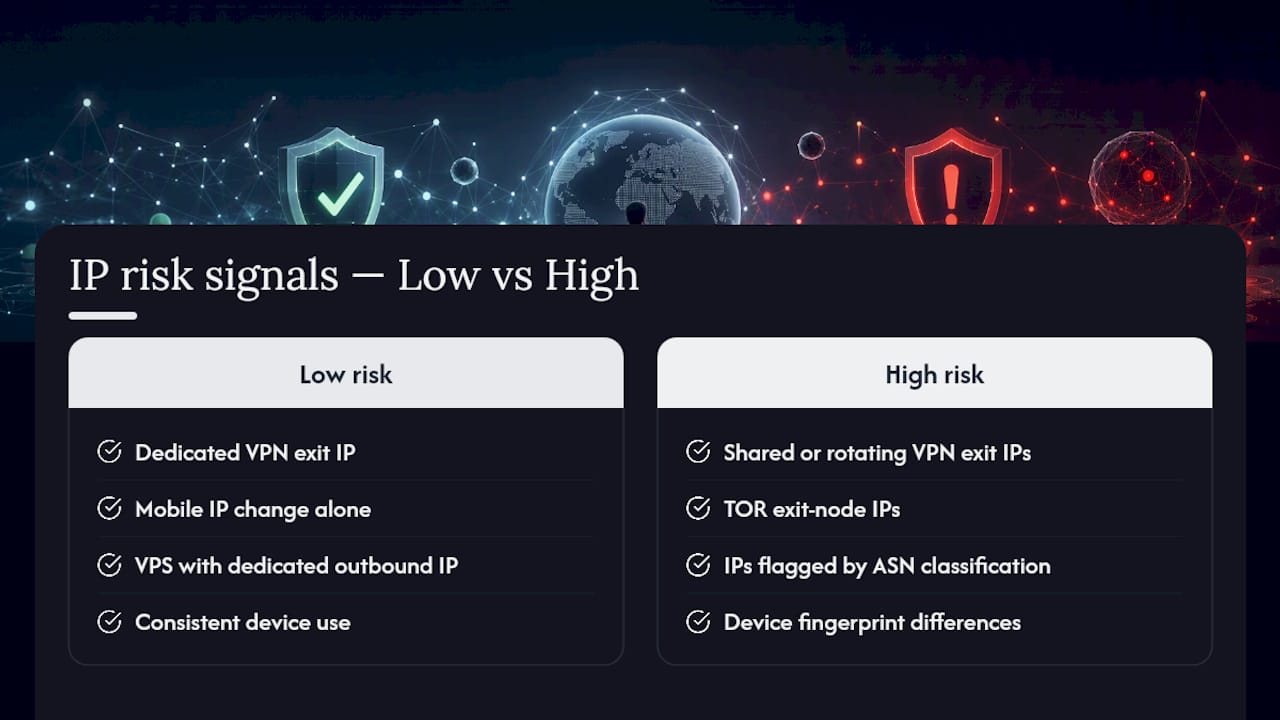
- Stop using rotating or free VPN services. They share exit IPs across thousands of unrelated users, which is exactly the pattern fraud filters are tuned to catch.
- Confirm you’re trading from a dedicated static IP or a VPS with a guaranteed, non-shared outbound address.
- Tell your firm’s support team before you travel. A pre-notified IP change is a footnote; an unexplained one is an investigation.
Two things should reassure you that this isn’t arbitrary. First, the scoring is automated and consistent. Firms run a composite IP risk score that weighs multiple signals rather than banning on a single IP mismatch. Second, the underlying data (VPN IP ranges, TOR exit-node lists) comes from maintained, third-party threat feeds, not guesswork, which means legitimate, well-documented exceptions are usually reviewable by a human.
Key Takeaways
Prop firm IP detection works by scoring combined signals (IP reputation, device fingerprint, and trade behavior) rather than reacting to any single IP change.
| Point | Details |
|---|---|
| Detection is layered | Firms check VPN ranges, TOR lists, ASN classification, and abuse scores together, not in isolation. |
| Shared IPs cause most flags | Budget VPNs and shared VPS plans mix hundreds of users behind one exit IP. |
| Fingerprints outlast IPs | Cookies, timezone, and device data can link accounts even after an IP changes. |
| Notify before you travel | A documented IP change is reviewable; an unexplained one triggers escalation. |
| Local execution limits exposure | Running trades on a dedicated machine or VPS avoids shared cloud-routing IPs entirely. |
How Prop Firm IP Detection Actually Works
Prop firm IP detection is not one check. It’s a pipeline, and understanding each stage tells you exactly where your setup can go wrong.
When you log in, the platform extracts your public IP and runs it through several databases in parallel. This includes VPN provider IP-range lists, known TOR exit-node registries, ASN classification (which flags datacenter versus residential origin), IP reputation and abuse-scoring databases, and geo or sanctions screening tied to jurisdictions under OFAC or FATF restrictions. Enterprise risk engines complete this entire lookup in a narrow window, often well under 50 milliseconds, so the check never slows down your trade execution.
The results feed into a composite risk score. No single flag (say, a datacenter ASN tag) automatically triggers a suspension. Instead, the system weighs how many signals point the same direction. A residential IP with a slightly unusual ASN might pass clean. A datacenter IP combined with a TOR-adjacent range and a login from a device that’s never touched the account before will score much higher.
| Detection layer | What it checks | Typical action if flagged alone |
|---|---|---|
| VPN/proxy IP-range match | Login IP against known VPN provider ranges | Warning or step-up verification |
| TOR exit-node list | Login IP against maintained TOR exit registries | Block or immediate escalation |
| ASN/datacenter classification | Whether the IP belongs to a hosting provider vs. residential ISP | Warning, closer monitoring |
| IP reputation/abuse score | History of the IP in fraud and spam databases | Warning to block, depending on score |
| Geo/sanctions check | IP location against restricted jurisdictions | Block, compliance review |
| Shared-IP clustering | Multiple distinct accounts logging in from the same IP or IP range | Manual review, likely escalation |
Behavioral correlation is what turns a single flag into a real case. Firms watch for identical trade entries and exits across supposedly unrelated accounts, timing patterns that suggest one person is running several logins, and device or browser fingerprints that repeat across accounts that shouldn’t be connected. AquaFunded’s own explanation of the IP rule frames this correctly: the goal isn’t to police your location, it’s to verify that the trader who passed the evaluation is the same person running the funded account.
What changes between evaluation and funded stages is the threshold, not the method. A firm might tolerate a borderline risk score during a challenge phase, then tighten enforcement sharply once real capital and payouts are on the line. That’s an operator-configured setting, and it varies firm by firm, but the direction is consistent: scrutiny goes up, not down, as your account grows.
A few detection categories worth knowing by name:
- ASN lookups: identify whether your IP belongs to a hosting company (AWS, DigitalOcean, generic VPS providers) or a residential ISP.
- Reputation scoring: flags IPs previously tied to fraud, spam, or abuse across unrelated platforms.
- Cluster analysis: catches multiple funded accounts sharing one IP address or a narrow IP block over time.
What Gets Flagged and the Mistakes Traders Actually Make
Most flags trace back to a handful of repeat offenders. Rotating or free VPN apps top the list because they cycle through shared exit IPs, and that instability is precisely the signature fraud systems are built to catch. Shared commercial proxy pools cause the same problem. So does using a budget VPS where the provider quietly resells the same IP block to hundreds of customers.
Other common triggers: logging in from two geographically distant locations within a short window (what risk teams call an “impossible travel” pattern), running identical trade entries and exits across multiple accounts, and connecting through a datacenter IP with no explanation on file.
Not every anomaly is a real problem, though. Mobile carrier IPs rotate constantly as you move between cell towers, which is normal churn, not evasion. Public Wi‑Fi at a coffee shop looks unusual once, but firms typically weigh patterns over time rather than reacting to a single session. A residential ISP reconnect that hands you a new dynamic IP is routine and rarely triggers anything on its own.
Here’s where it gets tricky: a single coffee-shop login is a non-event. That same login, stacked with a VPN-flagged range, a device the account has never used, and a trade that mirrors another account’s entry to the second, becomes something a risk team has to look at. Context is everything.
- Rotating/free VPNs with shared, frequently changing exit IPs
- Datacenter IPs used without any prior notice to the firm
- Simultaneous or near-simultaneous logins from distant locations
- Identical trade timing or sizing across supposedly separate accounts
Pro Tip: Before you travel, save your itinerary and hotel confirmation, and email your firm’s support team with your travel dates. A pre-notified IP change becomes a documented, authorized event instead of a mystery the risk team has to investigate cold.
How Firms Enforce the IP Rule and What Happens Next
Enforcement almost always follows the same shape, even though the exact triggers vary by firm. An automated system flags the login, often as a warn or block action. If the pattern looks serious enough, it escalates to a human risk-team review. At that point, you’ll typically get a request for supporting evidence. Depending on what comes back, the outcome ranges from a quick clearance to a temporary payout hold, a frozen account, or in more serious cases, termination.
- Automated detection assigns a risk score and applies a warn, block, or escalate action.
- A risk analyst reviews the flagged login alongside your account’s trading history.
- The firm may request documentation: travel proof, IP or VPS invoices, KYC confirmation.
- Based on the evidence, the account is cleared, restricted, or closed.
The likely outcome depends heavily on which firm you’re with and how strong your documentation is. A single clean explanation with proof often resolves things at the support-ticket stage. Weak or absent documentation, especially paired with a payout request already in progress, tends to trigger a longer hold while the review plays out.
If you do get flagged, have this ready:
- Travel documents (flight confirmations, hotel bookings) matching the dates of your IP change
- Invoices or account details for your static IP or VPS provider
- Screenshots of your IP address and connection details, timestamped
- KYC or identity confirmation already on file with the firm
Regulatory guidance around fraud disputes reinforces this approach. The CFTC’s customer advisory materials emphasize that clear documentation and prompt disclosure are what make disputed activity resolvable, whether you’re dealing with a broker, a platform, or a prop firm’s risk desk.
Thresholds also shift by account stage. A challenge account might tolerate a moderate risk score with just a warning. A funded account approaching a payout is usually held to a much stricter standard, since real capital and firm liability are now at stake.
Legitimate Ways to Stay Compliant With the IP Rule
The fix for most IP-related problems is boring, and that’s the point: get a connection that’s yours alone, and stick with it.
Shared infrastructure is the root cause behind the overwhelming majority of IP-rule violations. Vetted Prop Firms notes that most firms have no issue with a dedicated-IP VPS or a residential static IP. The actual hazard is budget VPN subscriptions and cheap shared VPS plans where dozens or hundreds of other customers route through the exact same exit address you’re using.

| Setup | Pros | Cons | Typical firm tolerance |
|---|---|---|---|
| Residential ISP, static IP | Looks natural to fraud filters, low cost | Requires ISP support for a static assignment | High |
| Dedicated-IP VPS | Consistent location, stable uptime, no home network dependency | Monthly cost, requires setup | High, if the IP is confirmed dedicated |
| Corporate office IP | Stable, often high reputation | Not practical for most independent traders | High |
| Mobile hotspot | Convenient backup | Frequent IP rotation, higher scrutiny | Low to moderate |
| Consumer VPN, shared exit IP | Cheap, easy to install | High risk of shared/flagged exit IPs | Low |
| VPN with dedicated exit IP | Combines privacy with a stable address | Fewer providers offer this, costs more | Moderate to high, if genuinely dedicated |
Notice the pattern: the deciding factor isn’t whether you use a VPN at all. It’s whether the IP behind it is yours alone or shared with strangers. A VPN encrypts and routes all your traffic through a remote server, and some providers will sell you a dedicated exit IP rather than a pooled one. A proxy, by contrast, forwards selective traffic and varies by protocol, which makes it a poor fit for consistent, whole-session trading anyway.
If you do change your setup or travel, don’t wait to be asked. Email your firm’s support desk before the change happens. Include your new IP or VPS provider, the dates involved, and a short explanation (“Traveling for work, will be trading from a hotel network in [city] from [date] to [date]”). That single email converts a red flag into an approved exception on file.
Pro Tip: Before committing to a VPS provider, ask directly whether the outbound IP is dedicated to your account or shared across a server pool, and cross-check that provider’s IP range against a public abuse database before you start trading on it. A five-minute check now beats a payout hold later.
For traders managing more than one account, the setup question gets more complicated fast, and it’s worth reading through Mt4copier’s guide on multi-account copying best practices before you scale up.
How to Test Whether Your Connection Will Pass Detection
Don’t guess. Test your exact setup before you request a payout or head out on a trip.
Start with a plain IP lookup (WHOIS, RIPE, or ARIN databases all work) to confirm your public IP and see how it’s registered. Run an ASN lookup next; this tells you whether your connection is tagged as a datacenter/hosting provider or a residential ISP, which is one of the fastest checks risk engines run. Then check that IP against a VPN detection service and a current TOR exit-node list to rule out the two most aggressive automatic blocks.
- Confirm your public IP through a WHOIS or ASN lookup tool
- Check the IP against a VPN/proxy detection service
- Cross-reference it with a current TOR exit-node list
- Verify your browser isn’t leaking an X-Forwarded-For header that exposes a proxy chain
- Confirm the geo-location matches where you’re actually trading from
- Check the IP’s abuse/reputation score on a public database
Run all of this from the exact machine and network you plan to trade on, not a different laptop or a different Wi‑Fi network. Screenshot every result with a visible timestamp and save it somewhere you can retrieve later. If a dispute ever comes up, that folder of screenshots is worth more than any explanation you could write after the fact.
A clean result looks like this: your ASN resolves to a residential ISP or a confirmed dedicated VPS, your abuse score is low, and you get zero hits on VPN or TOR lists. If any of those come back flagged, fix it before you trade, not after a payout gets held.
Why an IP Change Alone Doesn’t Hide You
Swapping your IP address does almost nothing if your device fingerprint stays the same. Firms record a layered set of signals beyond your IP: user-agent strings, timezone settings, installed fonts, screen resolution, and cookies tied to your browser session. Combined, these create a fingerprint that’s often more stable and more identifying than your IP ever was.
This is why AquaFunded’s breakdown of the IP rule stresses that firms correlate IP history with device fingerprints and trade-timing patterns together, not in isolation. A new IP paired with the exact same browser fingerprint and the exact same trade execution rhythm is a much stronger signal of shared or duplicated access than a raw IP mismatch alone.
Some of these identifiers persist longer than traders expect. Cookies survive browser restarts unless deliberately cleared. Timezone and font lists rarely change unless you switch operating systems entirely. That means an account “protected” by a new VPN IP can still get linked back to an old session through nothing but browser metadata.
Practical mitigation is simple, if a little tedious:
- Use the same device and browser profile every session rather than switching between machines
- Never mix a demo account and a funded account’s browser profile on the same machine
- Clear cookies deliberately only when you have a legitimate reason to switch context, and document why
- Keep timezone and system locale settings consistent with your stated location
Pro Tip: Pair a dedicated-IP VPS with a single, consistent browser profile you never use for anything else. That combination presents one stable identity to every layer of detection, not just the IP layer, which is usually what risk teams are actually looking for.
Local Execution: Reducing Cloud Routing Risk
One structural way to reduce IP-related exposure is to stop routing trades through shared cloud infrastructure altogether. Locally-installed trade copiers, including Mt4copier’s Local Trade Copier, run entirely on your own Windows machine or a VPS you control, executing trades from a master account to client accounts without sending data through a third-party cloud server. That means one IP address handles the entire operation, not a rotating pool of cloud endpoints shared across other users.
Local execution keeps every trade signal on the machine you control. There’s no external server in the routing path, no shared cloud IP pool, and no latency introduced by a middleman relay. For a prop firm trader, that’s one less variable a risk engine has to question.
Operationally, a few habits make this setup work well:
- Run the copier on a dedicated machine or VPS with a single, non-shared outbound IP
- Keep evaluation and funded accounts trading from the same region and machine whenever possible
- Lock down credentials with strong, unique passwords and avoid logging in from any shared device
- Never let another trader use your VPS or login credentials, even temporarily
Mt4copier has run since 2010, serves more than 3,000 users, and holds 491 Trustpilot reviews, with sub-0.5-second local execution across MT4, MT5, and DXTrade. That track record reflects reliability of the replication software itself, not trading outcomes. Local Trade Copier is trade replication software only. It copies existing trades and has no market logic, strategy layer, or outcome influence. Past results do not guarantee future performance.
What the IP Rule Is, in Plain Terms
The “IP rule” is a security and identity policy, not a location restriction. Prop firms use it to confirm that the person trading a funded account is the same person who passed the evaluation, and to prevent one login from being quietly shared across several accounts or resold to other traders.
Three problems drive this policy. First, account sharing: letting someone else trade your funded account, intentionally or not, breaks the firm’s risk model, since the person managing risk isn’t the person who proved they could. Second, copy-trading abuse: some traders try to mirror one evaluated strategy across dozens of accounts to multiply payouts from a single trading edge. Third, straightforward fraud prevention, since IP anomalies are one of the oldest and most reliable signals in account-security work generally.
None of this means changing your IP is inherently against the rules. It means an unexplained pattern (new IP, new device, trading behavior that shifts) reads as risk. A documented one, with your firm notified in advance, usually does not. That distinction is why firms build tiered responses (warn, then review, then escalate) rather than an instant ban on any IP change. The policy is designed to catch abuse patterns, not to punish someone whose ISP happened to reassign their home IP address overnight.
Mobile IPs and Dynamic Addresses: A Different Kind of Noise
Mobile carrier networks assign IPs dynamically and reassign them constantly as you move between cell towers, sometimes multiple times an hour. That’s simply how mobile networks operate, and risk engines that treat every mobile IP change as suspicious would flag nearly every phone-based trader on the planet.
Firms generally weigh mobile network churn differently from a sudden jump between two unrelated fixed locations. A mobile IP shifting within the same general region rarely triggers anything by itself. What raises concern is a mobile IP suddenly appearing in a country your account has never touched, especially stacked with a device fingerprint the account has never used before.
Residential dynamic IPs behave similarly. Most home internet connections reassign your IP address periodically, especially after a router reboot or an ISP-side reconnect. This is background noise that risk teams are built to tolerate, not a red flag on its own.
The practical takeaway: if you trade primarily from a phone or a home connection with a dynamic IP, you don’t need to panic about routine reassignments. What matters is avoiding sharp geographic jumps without warning and keeping your device fingerprint consistent, since that’s the layer that actually distinguishes normal churn from a real anomaly.
Machine Learning and the Next Wave of Detection
Static rule lists (block this VPN range, flag this ASN) are being supplemented, not replaced, by anomaly-detection models that learn what “normal” looks like for each individual account. Instead of checking a login against a fixed list, these systems build a baseline: your usual login times, typical IP ranges, common trade sizes, and habitual timing patterns.
Once that baseline exists, the model flags deviations even when no single signal breaks a hard rule. A login IP that isn’t on any VPN or abuse list can still get flagged if it arrives at an unusual hour, from an unfamiliar device, right before a trade pattern that doesn’t match your history. This is a meaningful shift: it means “clean” IP hygiene alone is no longer a complete defense if your broader behavior looks inconsistent.
The practical implication for traders is straightforward. Consistency across sessions, same device, similar login windows, familiar IP range, matters more than ever, because the systems watching your account are increasingly comparing you against yourself, not just against a shared blocklist.
Real-World Flagging Scenarios and How They Resolve
Consider a trader who logs in from home for weeks, then suddenly logs in from a hotel Wi‑Fi network in another country during a work trip, with a payout request pending. That combination (new IP, new device fingerprint, financial event) is close to a worst-case pattern, even though nothing fraudulent happened. Resolution typically comes down to documentation: flight records, hotel confirmation, and a support ticket filed proactively.
A second common case involves a trader using a budget VPS to save money, unaware that the provider resells the same IP block to hundreds of other customers. The account gets flagged not because of anything the trader did, but because that shared IP has already been tied to other accounts on the same platform. The fix is switching to a VPS provider that guarantees a dedicated outbound IP, then notifying the firm of the change.
A third scenario: two friends, both funded traders, occasionally log into each other’s accounts to help manage trades while one is unavailable. Even with good intentions, this creates the exact IP-and-device overlap pattern that account-sharing detection is designed to catch, and it’s one of the harder situations to resolve because the behavior genuinely did violate the account-sharing policy the rule exists to enforce.
Privacy and Data Protection While Staying Compliant
Complying with IP monitoring doesn’t mean handing over more personal data than necessary. Keep your documentation focused: travel proof, IP or VPS invoices, and screenshots are usually sufficient. You generally don’t need to share full financial records or unrelated personal details just to explain an IP change.
Store your compliance evidence somewhere secure and separate from your main email inbox, since these documents (travel dates, home address hints, device details) carry real personal information. Encrypt sensitive files if your storage solution supports it, and avoid pasting screenshots into shared or public channels like open forums when troubleshooting.
When you do communicate with a firm’s risk team, share only what directly supports your case. If a support request asks for broader access than the situation calls for, it’s reasonable to ask why that specific document is needed before providing it. Good compliance and reasonable data privacy aren’t in conflict here. Both come down to giving firms exactly what resolves the question, and nothing more.
Ready to Reduce Your IP Risk Today?
If shared or cloud-routed infrastructure is the recurring problem behind IP flags, the fix isn’t more VPN switching. It’s removing the shared middle layer entirely. Mt4copier’s Local Trade Copier runs trade replication directly on your own Windows machine or VPS, with no cloud broker routing between your master and client accounts, so the same IP address handles every trade, session after session.
Setup takes a single install, and the software supports MT4, MT5, and DXTrade under one subscription with a 7-day free trial. Traders managing several funded accounts often pair it with a dedicated VPS to keep both the execution environment and the outbound IP fully under their own control. See how it runs in practice before committing to a setup change.
Local Trade Copier is trade replication software only. It copies trades from a master account to client accounts and has no strategy layer or market logic of its own. Past results do not guarantee future performance.
A Technically Precise Take on the IP Rule
Most articles on this topic treat the IP rule like a checkbox: get a VPN, don’t get caught. That framing misses what’s actually happening. Firms aren’t scanning for VPN usage. They’re scanning for inconsistency, and a poorly chosen VPN just happens to be the most common source of it.
The conventional advice, “avoid VPNs entirely,” is overcautious and often impractical for traders who travel or manage multiple jurisdictions. The sharper advice is to fix the infrastructure: a dedicated IP, whether through a VPS, a static residential connection, or a genuinely dedicated VPN exit, solves the underlying problem regardless of whether “VPN” appears anywhere in your setup.
What gets underrated is device fingerprinting. Traders fixate on their IP address while leaving browser cookies, timezone settings, and login devices completely inconsistent across sessions. Fix the IP and ignore the fingerprint, and you’ve solved half the problem at best. Prioritize consistency across your whole connection profile, not just the address, and most of the anxiety around this rule disappears.
Frequently Asked Questions About Prop Firm IP Detection
How do prop firms detect IP address changes?
Firms run your login IP through VPN and proxy databases, TOR exit-node lists, and ASN classification systems in real time, then combine that with device fingerprints and trade-timing patterns to build a composite risk score.
Will using a VPN get my prop firm account banned?
Not automatically. The risk comes from shared or rotating VPN exit IPs used by many other people. A VPN with a genuinely dedicated exit IP is treated very differently from a free, shared VPN service.
What should I do if my account gets flagged for a suspicious IP?
Contact your firm’s support team immediately with documentation: travel confirmations, VPS or ISP invoices, and timestamped screenshots of your connection. Clear, prompt disclosure tends to resolve these cases faster.
Does a mobile IP change count as suspicious activity?
Usually not on its own. Mobile networks reassign IPs constantly as part of normal operation. Firms typically look for larger anomalies, like a mobile IP suddenly appearing in an unfamiliar country alongside an unrecognized device.
Can device fingerprinting flag me even if my IP looks clean?
Yes. Browser metadata, timezone settings, and cookies can link accounts together even when the IP address itself raises no red flags, which is why consistent device use matters as much as IP hygiene.
Is a VPS a safe way to trade a funded account?
A VPS is generally accepted, provided the outbound IP is dedicated to you rather than shared across other customers on the same server. Confirm this directly with your provider before you start trading on it.
This article is general information, not a substitute for advice from a qualified financial advisor. Consult a qualified financial professional about your own circumstances before acting on anything here.
Sources
For readers who want to run their own checks or verify specific claims, these are the primary reference points worth bookmarking:
Recommended
- Sales Page | Trade Copier for MT4 & MT5
- Sales Page | Trade Copier for MT4 & MT5
- Prop Firm Account Management Tips: Maximize Efficiency
- Prop firm trading advantages with smart trade copying
