

The safest way to handle different leverage trade copying is a local, EA-based copier that scales each account by equity or fixed risk percentage instead of copying raw lot sizes. This approach keeps risk proportional across accounts with different balances or leverage caps, runs on your own machine or VPS rather than a shared cloud server, and helps avoid IP-detection issues observed by prop firms. A local trade copier tool with a long track record is suitable for this use case. The following sections explain recommended setup details, formulas, and fail-safes.
TL;DR:
- Using equity-based or risk-percentage scaling prevents small accounts from being overwhelmed by lot sizes and ensures proportional risk across different account sizes.
- Pre-live testing with demo accounts, verifying trade replication and stop-loss behaviors, is essential to avoid costly configuration errors when switching to live trading.
- Setting appropriate risk controls such as daily loss limits, maximum open trades, and margin buffers helps prevent runaway trades from causing account blowouts.
- Latency impacts scalping and tight-stop strategies more significantly, with local copiers typically executing trades under 0.5 seconds, reducing slippage and price gaps.
- Proper pre-trade calculations for margin and leverage, combined with layer-specific safeguards like lot caps and account risk settings, mitigate margin calls across diverse leveraged accounts.
How Do You Set Up Different Leverage Trade Copying Locally?
A local copier setup involves configuring terminals on the same machine and verifying that trades replicate correctly prior to using live funds.
Here’s the sequence that gets you there without guesswork:
- Install terminals on one machine or VPS. Run your master MT4/MT5/DXTrade terminal alongside every client terminal on the same Windows PC or VPS instance, since that shared local environment is what gives you sub-second copying instead of cloud-routed delays.
- Install the copier EA on each terminal. The master terminal gets a sender component; each client terminal gets a receiver component paired to it.
- Log in to master and client accounts. Confirm each terminal is connected to its broker with live pricing and no requote errors.
- Pair the EA server and client instances. Match the master to its intended clients using the software’s pairing IDs, not just account numbers, to avoid cross-wiring accounts.
- Set your network and IP posture. For funded or prop accounts, keep each master/client pair on infrastructure tied to a single, consistent IP address. Cloud copiers routing several users through shared servers create identical entry timestamps that look like coordinated group trading to prop firms.
- Size your VPS correctly. A basic VPS (1 CPU core, 2GB RAM) handles two or three terminals fine; scale up for five or more accounts or heavier tick volume.
- Run demo-to-demo tests first. Open a trade on the demo master and confirm it lands on every demo client with correct direction, SL/TP, and volume.
- Verify SL/TP and trailing behavior. Modify a stop loss on the master and check it propagates.
- Check logs and timestamps. Review the copier’s log file for execution times; anything consistently over a second on a local setup usually points to a terminal resource problem, not the copier itself.
Pro Tip: Run your demo verification checklist, including a symbol-match test and a forced global-loss trigger, before ever connecting a live account. It catches configuration mistakes when they cost you nothing. The demo video walkthrough shows this exact sequence end to end.
If you’re copying to three or more clients from one master, the master-to-three-clients configuration guide walks through the pairing step in more detail.
What’s the Best Way to Scale Lot Sizes Across Leverage Levels?
Copying lot-for-lot across accounts with different balances or leverage is the single most common mistake account managers make, and it’s the fastest way to blow up a smaller account while barely moving a larger one.
Two models solve this reliably:
- Equity-based scaling. The formula is straightforward: (Slave Equity ÷ Master Equity) × Master Lot = Slave Lot. A master trading 1.0 lots with $50,000 equity sends 0.20 lots to a client with $10,000 equity. Round to the broker’s minimum lot step, and set a floor so the calculation never rounds down to zero on a small account.
- Risk-percentage scaling. Instead of matching equity ratios, you size each client’s lot so the trade risks a fixed percentage of that account’s balance, based on stop-loss distance. This method accounts for leverage directly, since a client with tighter leverage will need a smaller position to keep the same dollar risk. Both models are the standard recommendation over blind lot-matching when account sizes or leverage differ.
On top of either model, layer in:
- Multipliers below 1.0 for accounts with stricter drawdown rules, such as funded evaluations.
- Fixed-lot overrides for clients who want a constant position size regardless of the master’s volume.
- Min/max lot caps so no single copied trade can exceed a client account’s risk tolerance, even if the formula would otherwise push it higher.
Quick reference: a common starting point for funded or evaluation accounts is a 0.6 to 0.8 multiplier during demo testing, tightened further once you confirm the account’s daily loss limits hold under real market volatility. The account allocation guide covers how to split capital across multiple client accounts before you set these ratios.
What Risk Controls Prevent a Bad Trade From Wrecking an Account?
Scaling formulas only work if something stops a runaway trade before it executes, not after.
Set these before you go live:
- Global and per-account daily loss limits, enforced pre-execution so a losing streak halts new copies instead of just alerting you after the damage.
- Max open trades and per-symbol caps, which stop concentration risk when the master fires several correlated signals in a row.
- Max exposure limits per account, capping total lot volume regardless of how many trades are open.
- Equity protection thresholds that pause copying entirely once an account’s equity drops below a set percentage of its starting balance.
- Margin-based copy suspension, disabling new trades on any client account approaching a margin call.
Pro Tip: Set the equity protection threshold slightly above your broker’s actual margin call level, not at it. That buffer gives the copier time to react before the broker forces a liquidation.
Local pre-execution checks catch these conditions before an order is sent. Cloud-based systems typically enforce risk limits asynchronously, which means the risky trade can already be filled by the time the system flags it. Full configuration options for these limits are covered on the risk parameters page.
Does Latency Actually Matter for Copied Trades?
Yes, and it matters more the tighter your stop losses are. A local copier keeps trade data on one machine, which is why execution typically lands under 0.5 seconds regardless of market conditions.
- Scalping strategies and tight SL/TP setups suffer most from delay, since even a quarter-second gap can mean a different fill price on a fast-moving pair.
- Spreads, slippage, and mismatched contract specs between brokers still create fill differences even at zero latency, so symbol mapping and a small slippage buffer stay necessary.
- Review timestamps and logs regularly. Small, consistent price gaps between master and client fills are normal; growing gaps signal a terminal or connection problem.
- Cloud copying can be workable for slower swing strategies with wide stops, but it’s a poor fit for scalping or any prop account with strict same-price rules.
How Do You Fix Common Errors in a Multi-Account Copier Setup?
Most copying failures trace back to one of four causes, and each has a known fix.
- Symbol mismatches. Brokers name the same instrument differently (EURUSD vs EURUSD.a). Use the copier’s symbol mapping or alias feature to link them, as detailed in the mismatched contract specs guide.
- MT4/MT5 client errors, including error 133. These almost always trace to a permissions, login, or terminal-state issue. The error 133 troubleshooting page walks through the standard checklist.
- Margin or leverage rejections. If a client broker enforces tighter leverage than the master, pre-calculate required margin for the scaled lot size and drop the multiplier if it’s too close to the limit.
- Operational drift. Confirm time sync between terminals, verify the EA is still enabled after a terminal restart, check VPS uptime, and scan the log file weekly for silent failures.
Why Does Author Experience Matter Here?
Rimantas built Local Trade Copier starting in 2010, and the product has grown into one of the more established locally-installed copiers for MT4, MT5, and DXTrade, now used by more than 3,000 traders and account managers.
What that history backs up:
- 491 Trustpilot reviews from active users running multi-account setups, not a marketing claim made in isolation.
- Per-account lot scaling with 18 separate risk and lot management options, covering equity-based, risk-based, fixed, and multiplier modes in one product.
- Cross-platform copying across MT4, MT5, and DXTrade under a single subscription, useful for account managers whose clients aren’t all on the same platform.
- Local execution architecture built specifically around the prop-firm detection problem, since local, on-machine copying avoids the shared-IP pattern that triggers scrutiny.
A trade copier that has run continuously since 2010, with a base of 3,000-plus users and 491 public reviews, gives account managers a track record they can check independently rather than take on faith.
Past results do not guarantee future performance, and none of this changes what the software actually is: replication logic that copies existing trades implements, not a system that generates or improves trading decisions.
What Do Real Per-Account Risk Settings Look Like?
Configuring risk parameters gets concrete once you’re inside the software instead of just reading formulas.
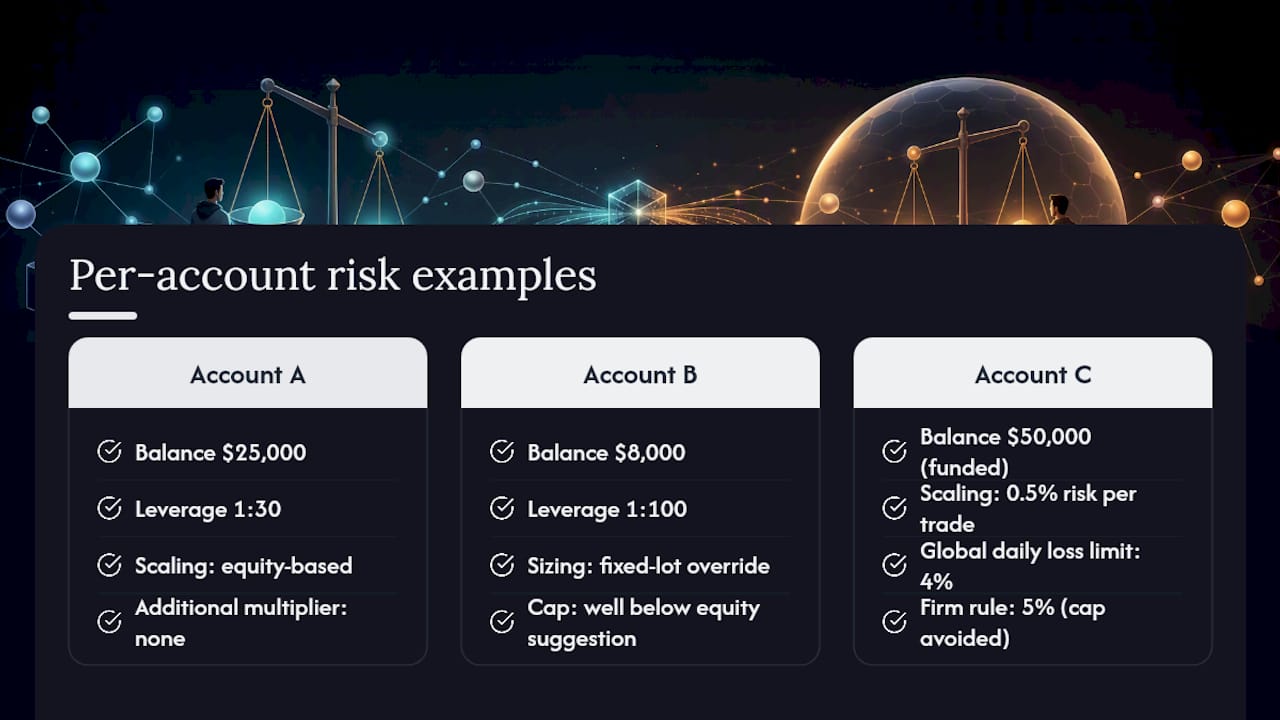
Say you’re managing three client accounts off one master, each with different balances and leverage limits. Account A has $25,000 at 1:30 leverage, Account B has $8,000 at 1:100 leverage, and Account C is a funded evaluation account at $50,000 with a strict 5% daily drawdown rule.
For Account A, you’d set equity-based scaling with no additional multiplier, since its leverage is close to the master’s and its balance supports proportional sizing without adjustment. Account B, despite higher leverage, gets a fixed-lot override capped well below what equity scaling alone would suggest, because a smaller account absorbs volatility worse even with more available margin. Account C gets risk-percentage scaling capped at 0.5% risk per trade, paired with a global daily loss limit set at 4%, a full point under the firm’s actual 5% rule, so the copier halts before the account manager even sees a breach alert.
Each of these settings lives in the per-account configuration panel rather than a global default, which is the entire point. One master strategy, three different risk postures, applied automatically on every trade. Currency mismatches between accounts add another layer. If your client account trades in a different base currency than the master, check the currency conversion guidance before finalizing your lot calculations.
How Do You Handle Margin Calls Across Accounts With Different Leverage?
Margin call risk is exactly where different leverage trade copying goes wrong if you’re copying by lot size instead of by risk. An account at 1:500 leverage can absorb a position size that would push a 1:30 account into a margin call almost immediately, even on the identical trade.
The fix starts before the trade, not after. Pre-calculate required margin for each client’s scaled lot size using that account’s actual leverage, not the master’s. If a client account’s free margin would drop below a safe threshold, most copier setups let you either shrink the scaling multiplier automatically or block the copy entirely rather than risk a forced liquidation.
Build in a buffer, not a boundary. Setting your equity protection threshold at exactly the broker’s margin call level gives you zero reaction time. Set it 10 to 15% above that level instead, so the software has room to close or pause positions before the broker’s own systems step in. This matters even more on accounts with tighter leverage, since they have less room to absorb an adverse move before margin becomes critical.
Watch for cascading margin pressure on accounts running several open trades from the same master. Each new copied trade adds to used margin, and on a tightly-leveraged account, the fifth correlated trade can tip an account that was fine after the first four. A max open trades cap, set lower on lower-leverage accounts, is the simplest defense.
Can You Reduce Slippage Differences Between Leveraged Accounts?
Slippage isn’t caused by leverage directly, but leverage differences change how much a given slippage amount actually costs an account, which is why it deserves separate handling in a multi-account setup.
A few practical adjustments narrow the gap between accounts:
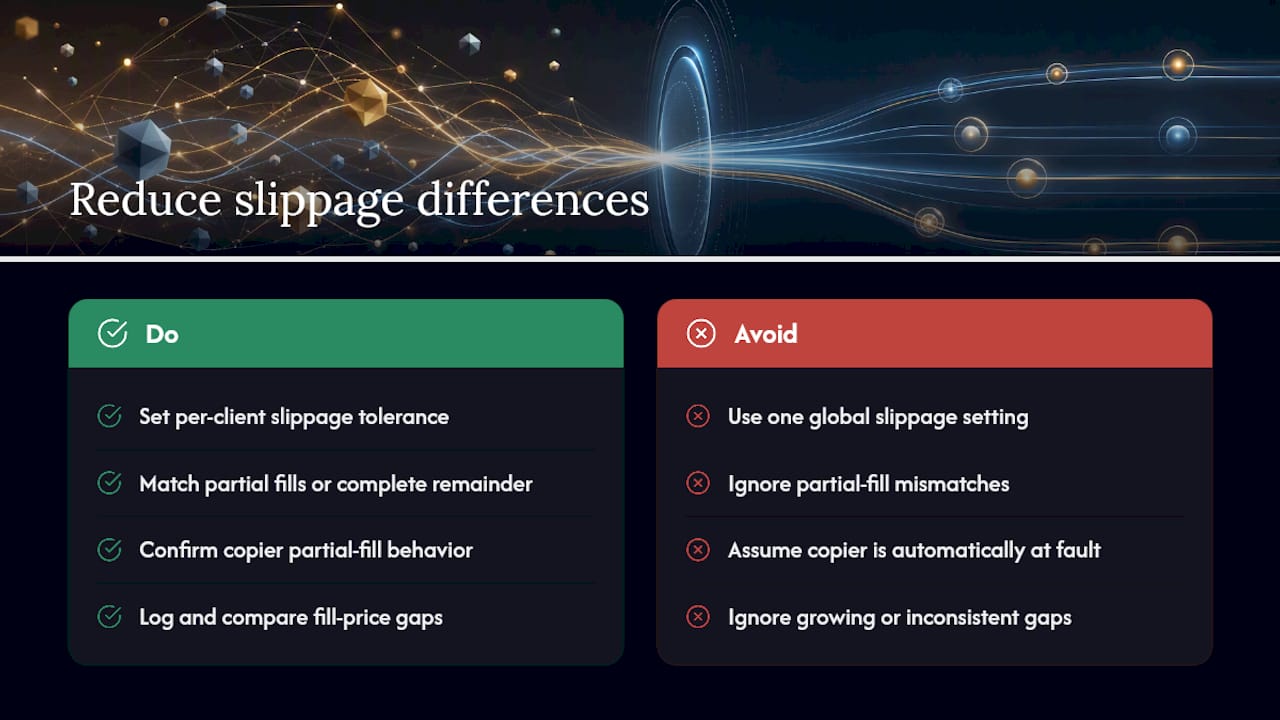
Set a maximum slippage tolerance per client account rather than one global setting, since a highly leveraged account can absorb a wider slippage buffer without meaningfully changing its risk profile, while a tightly leveraged account needs a tighter cap to avoid an outsized impact on margin.
Watch for partial fills on lower-liquidity symbols. When a broker only fills part of an order, the copier needs to either match the partial fill ratio on client accounts or complete the remainder as a separate order. Confirm which behavior your setup uses, since mismatched partial-fill handling is a common source of quiet scaling drift between master and client accounts over time.
Review fill-price gaps against your logs rather than assuming slippage is a copier problem. Small, consistent gaps between master and client fills usually reflect real spread and liquidity differences between brokers, not a copying delay. Growing or inconsistent gaps are worth investigating on the terminal side first.
Local Copying Deserves More Credit Than It Gets
The trading world spends a lot of energy debating strategy and almost none debating execution infrastructure, and that’s backwards for anyone running more than one account. Everyone wants to talk about entries and exits. Almost nobody wants to talk about the fact that a cloud-routed copier can quietly cost you a margin call on one account while the master trade performs exactly as intended.
The conventional advice, copy trades one-to-one and adjust later, fails the moment two accounts have different leverage or balances. It’s not a minor inefficiency. It’s the difference between an account manager running a clean multi-account operation and one explaining to a client why a scaled position size didn’t match what was promised.
What actually deserves priority: get the scaling formula right before anything else, then build the fail-safes around it, then worry about latency and edge cases. Most people reverse that order, chasing speed before they’ve confirmed their risk math is even sound. Get the math right first. Speed only matters once the numbers behind it are correct.
— Rimantas
Ready to Test Different Leverage Trade Copying Yourself?
If you’ve been copying trades manually across accounts with mismatched leverage, or running a cloud copier that adds routing delay and IP exposure, You can use a local trade copier that runs on your own PC or VPS, with equity- and risk-based scaling built into one subscription covering multiple platforms.

Start where every setup in this guide started: on demo. Configure your scaling model, set your daily loss limits, and run the replication checklist before touching a live account. The installation guide walks through terminal setup on both platforms, and the demo video shows the exact copying behavior you should expect to see once it’s running.
Past results do not guarantee future performance, and this software copies existing trades only. It doesn’t generate signals, analyze markets, or influence trading outcomes. Test any configuration on a demo account first, confirm it behaves the way you expect, and only then move to live capital.
Sources
- What is Local Trade Copier for MetaTrader 4 Account
- How to use prop-firm trade copiers: the ultimate guide to multi-account execution
- Local Trade Copier + VPS vs Cloud Copier: Total Cost Comparison | Copilink
- Local vs Cloud Trade Copier: Which Is Best?
Recommended
- Local Trade Copier 3.0.0 Introduces New Execution Controls for Prop Firm and Multi-Account Traders
- Prop trading best practices: Multi-account copying in 2026
- Prop Firm Account Manager Copier Setup Guide
- Local Trade Copier Updates MT4 and MT5 Versions with New Tools for Prop Firm and Retail Traders
