
Risk parity allocation, in a trade copying context, means setting each account’s lot size so every account risks the same dollar amount (or the same percentage of its own balance) on every trade, regardless of that account’s size. You calculate it from account balance, risk percent, stop-loss in pips, and pip value.
- Use a position-size calculator to check your math before trusting any copier’s auto-scaling.
- Cross-reference lot output against BabyPips’ position size tool since formulas vary slightly by rounding method.
- Configure the actual scaling in Mt4copier (Local Trade Copier), which applies the calculation automatically per client account.
Quick math: A $10,000 account risking a small percentage on a 25-pip stop, trading a pair with a typical $10 pip value, computes to a fractional lot position. Smaller accounts with lower balances and the same risk and stop generally scale down proportionally. That’s the entire mechanism.
Key Takeaways
Risk parity allocation works because it ties every account’s lot size to that account’s own balance, risk percent, stop-loss, and pip value, not to a flat lot number.
| Point | Details |
|---|---|
| Use the standard formula | Lot Size = (Account Balance × Risk %) / (Stop-Loss in Pips × Pip Value) for every account. |
| Pick the right scaling mode | Fixed-percent risk suits mixed balances; balance-ratio suits accounts meant to move together. |
| Never adjust stops for lot size | Set the stop from chart structure first, then calculate the lot size from it. |
| Test on demo before going live | Verify rounding, symbol mapping, and minimum-lot behavior across at least three account sizes. |
| Configure it in Mt4copier | Local Trade Copier automates fixed lot, multiplier, balance-ratio, and max-lot caps across MT4, MT5, and DXTrade. |
How Risk Parity Allocation Works in a Trade Copier
The formula behind risk parity allocation is the same one professional position-sizing calculators have used for years:
Lot Size = (Account Balance × Risk %) / (Stop-Loss in Pips × Pip Value)
Every input matters, and getting one wrong quietly breaks the whole calculation.
“Position-size calculators compute lot size from account size, risk percentage, stop-loss in pips, and pip value, and apply current exchange rates when account currency differs from the pair’s quote currency.” That currency-conversion step is where most manual calculations go wrong, according to Myfxbook’s position sizing tool.
Pip value itself depends on the pair and your account currency. For a USD account trading EUR/USD, a standard lot’s pip value is roughly $10, but that number shifts the moment your account currency differs from the pair’s quote currency, which is why calculators pull live exchange rates rather than using a static table.
Here’s a worked example:
- Account balance: $8,000, account currency USD
- Risk per trade: 1% = $80
- Stop-loss: 40 pips
- Pair: EUR/USD, pip value ≈ $10 per standard lot
- Lot size = $80 / (40 × $10) = 0.2 lots
Most brokers round to the nearest 0.01 lot step, and your final number also has to clear the broker’s minimum lot (usually 0.01) and respect margin limits. If the raw calculation returns 0.006 lots, you either round down to zero and skip the trade or round up to the minimum and accept slightly higher risk. Neither is wrong. Just know which one your copier defaults to.
What Copier Scaling Modes Should You Use?
Local trade copiers generally offer a handful of scaling modes, and picking the wrong one for your account mix is the single most common configuration mistake.
- Fixed percent risk per trade recalculates lot size on every signal using the formula above, ideal when accounts vary wildly in balance.
- Balance-ratio scaling copies volume proportionally to account size relative to the master, useful for a family of accounts that should move in lockstep.
- Lot multiplier applies a flat multiplier to the master’s lot size, simple but blind to balance differences.
- Fixed lot copies the exact same lot size to every client regardless of balance, which works only when accounts are similarly sized or you want deliberately unequal risk.
- Max-lot protection caps the final volume regardless of what the other modes calculate, acting as a safety net rather than a primary mode.
Micro accounts pair well with fixed-percent risk. Prop firm accounts with strict drawdown ceilings often do better with balance-ratio scaling plus a max-lot cap layered on top, since combining balance ratio with a lot multiplier gives you both proportional exposure and a hard ceiling.
Pro Tip: Never move a stop-loss to make a lot size look cleaner. Set your stop where the chart or volatility says it belongs, then let the formula produce whatever lot size results, even if it’s an odd number.
One more thing: if you’re copying signals from multiple correlated pairs (say, EUR/USD and GBP/USD moving together), balance-ratio scaling on each account can still stack directional risk. The mode controls per-trade sizing, not aggregate exposure across open positions.
How Do You Configure Risk Parity in a Trade Copier?
Setting this up correctly the first time saves you from re-running trades after a bad configuration. Here’s the sequence:
- Install the copier software on the machine or VPS that will run continuously.
- Authorize the master account and connect each client account.
- Choose your scaling mode (fixed-percent, balance-ratio, multiplier, or fixed-lot) per client.
- Set global caps: a per-trade maximum lot, a provider allocation cap, and an account-level equity stop.
- Enable a default stop-loss for any signal that arrives without one.
- Run every account on demo first, and only move to live once logs confirm expected behavior.
Testing checklist before going live:
- Confirm symbol mapping matches across master and client brokers (EURUSD vs EURUSD.m, for instance).
- Verify rounding and volume-step behavior against your broker’s minimum lot increments.
- Check what happens when the formula returns below the minimum lot, does it skip or round up.
- Watch for slippage and execution latency between master and client fills.
- Review the transaction log after each test session, not just the account balance.
Mt4copier (Local Trade Copier) has run this exact workflow since 2010, and its base of 3,000+ users has left 491 reviews on Trustpilot. It supports MT4, MT5, and DXTrade under one subscription, with a 7-day free trial for testing configurations before committing. The installation guide walks through connecting master and client terminals step by step.
Pro Tip: Test your configuration across at least three different account sizes, not just one. A setting that behaves correctly on a $10,000 account can produce a zero-lot or minimum-lot result on a $500 account.
Layered controls matter here too. Copy trading risk management guidance recommends provider allocation caps and an account-level equity stop as standard defenses, since fixed-ratio scaling alone can’t prevent a correlated drawdown from wiping out multiple accounts at once.
Common Pitfalls That Break Risk Parity Consistency
Even a correctly configured copier drifts from true risk parity if you ignore a few operational realities.
- Minimum lot and rounding: a small account risking 0.5% on a wide stop may calculate to less than the broker’s minimum lot, forcing you to either skip the trade or accept extra risk.
- Symbol mismatches: broker suffixes (EURUSD.a vs EURUSD) cause missed trades if symbol mapping isn’t verified first.
- Missing stop-loss from the provider: attach a default stop, such as 2× ATR, so ungated trades don’t carry unlimited risk.
- Correlated exposure: copying several strategies trading the same currency pairs compounds risk even when each account looks individually balanced. Correlation across pairs can concentrate exposure without any single account appearing over-leveraged.
- Leverage mismatches: different brokers offering different leverage on the same account size change the effective margin available, which shifts your real risk ceiling.
- Rejected or partial fills: track these separately, since a partial fill silently changes your actual position size versus what the formula intended.
Monitor used margin percentage, total open-risk percentage across all accounts, and provider-level allocation caps daily, not just after a losing week.
Three Worked Examples You Can Test Right Now
- Micro account: $500 balance, 0.5% risk ($2.50), 20-pip stop, EUR/USD, pip value ≈ $10 per standard lot. Lot size = $2.50 / (20 × $10) = 0.0125, rounds to 0.01 lots (the broker minimum).
- Small account: $5,000 balance, 1% risk ($50), 30-pip stop, GBP/USD, pip value ≈ $10. Lot size = $50 / (30 × $10) = 0.17 lots.
- Mid-size account: $25,000 balance, 0.75% risk ($187.50), 50-pip stop, USD/JPY, pip value approximately $9.20 (adjusted for the current exchange rate). Lot size = $187.50 / (50 × $9.20) ≈ 0.41 lots.
Pip value for JPY pairs and other cross-pairs shifts with the exchange rate, so recheck it periodically rather than assuming a fixed number. Past results do not guarantee future performance, and these examples illustrate the calculation only, not expected trading outcomes.
When does strict parity matter most?

Strict risk parity earns its keep when drawdown limits are rigid, like prop-firm evaluation accounts, or when you’re managing client accounts of wildly different sizes and need every account to feel the same percentage impact from a single signal. For a handful of personal accounts of similar size, looser balance-ratio scaling with a max-lot cap is usually enough, checked weekly rather than after every trade.
How Local Trade Copier Puts This Into Practice
Everything above, the formula, the scaling modes, the caps, is exactly what Mt4copier (Local Trade Copier) was built to automate across MT4, MT5, and DXTrade accounts.

The software includes 18 lot size and risk management options: fixed lot, lot multiplier, balance-ratio scaling, max-lot protection, and free-margin protection among them, so you’re not stuck manually recalculating every account after a balance change. It attaches default stop-losses when a provider signal arrives without one, and it runs locally on your Windows machine or VPS with sub-0.5-second execution, meaning no cloud routing and one IP address for prop firm accounts that need to avoid detection risk.
Start with the 7-day free trial and run it on demo accounts first: install on a VPS, connect a demo master and two or three demo clients of different sizes, then verify rounding, symbol mapping, and lot output before ever touching a live account. Active since 2010, with 3,000+ users and 491 Trustpilot reviews, Local Trade Copier is a trade replication tool only. It copies existing trades and has no strategy layer or market logic of its own, and past results do not guarantee future performance. Check the installation walkthrough to get your first master-client connection running today.
Frequently Asked Questions
What is risk parity allocation in trade copying?
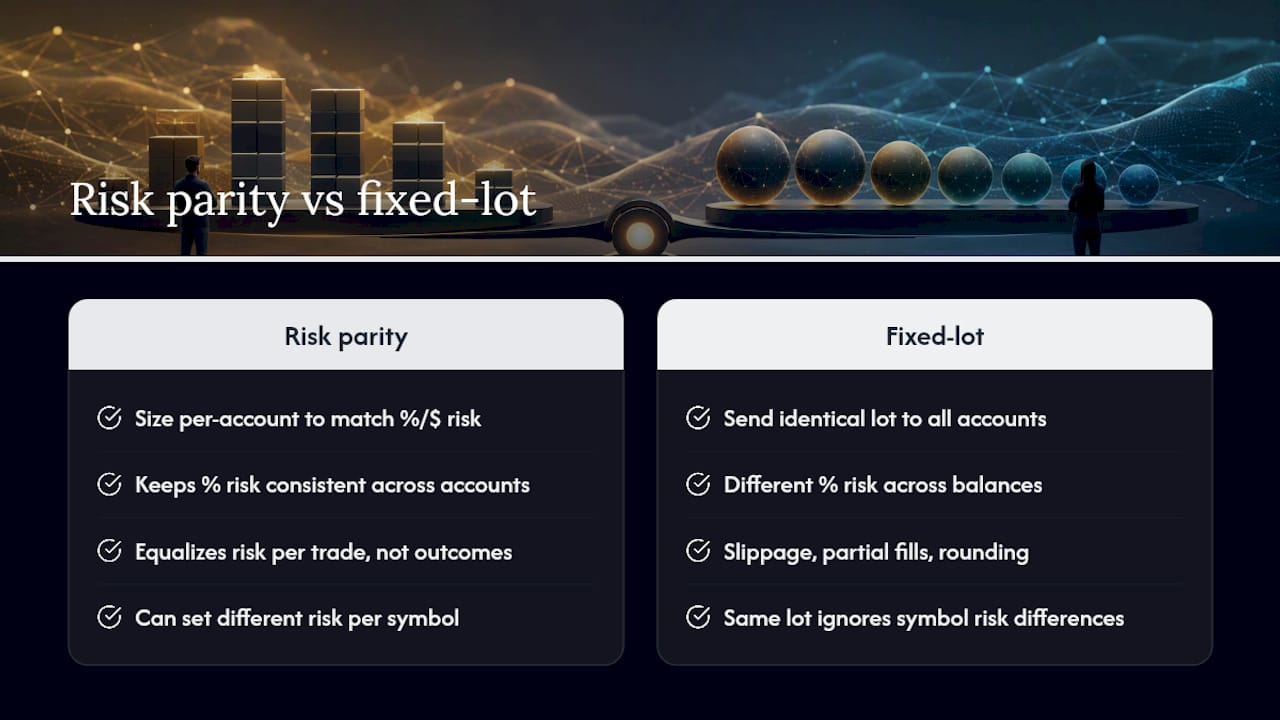
It’s the practice of sizing each copied account’s lot volume so every account risks a comparable dollar amount or percentage per trade, calculated from that account’s own balance, risk setting, stop-loss distance, and pip value.
How is risk parity allocation different from traditional lot copying?
Traditional fixed-lot copying sends the same lot size to every account regardless of balance, which means a $1,000 account and a $50,000 account take on wildly different percentage risk from the identical trade. Risk parity allocation adjusts the lot per account so the percentage risk stays consistent.
What risk percentage should I use per trade across multiple accounts?
Most practitioners start conservative, often 0.5% to 1% per trade, and adjust based on how many accounts and providers you’re running simultaneously, since copying multiple uncorrelated strategies still requires monitoring combined exposure, not just per-trade risk.
Does risk parity allocation guarantee equal outcomes across accounts?
No. It equalizes the dollar or percentage risk taken on each trade, not the outcome. Slippage, partial fills, and broker-specific rounding can still produce slightly different results account to account, and past results do not guarantee future performance.
Can I set different risk percentages for different symbols?
Yes, most copiers let you assign different risk settings per pair, which helps manage correlated exposure when copying signals across related currency pairs.
This article is general information, not a substitute for advice from a qualified financial advisor. Consult a qualified financial professional about your own circumstances before acting on anything here.
Sources
- Myfxbook Position/Lot Size Calculator
- BabyPips position size calculator
- Trading risk management: 3 essential rules for copiers
