

Proportional lot sizing scales each copied trade so a client account receives a volume matched to its own balance or risk settings instead of a flat copy of the master’s lot. The practical recommendation is to start with balance-proportional scaling, round every output to match each symbol’s volume specifications, and confirm the setup on a demo account before copying live with a tool such as Local Trade Copier.
TL;DR:
- Use balance as the baseline for ordinary copying, but switch to equity when floating gains or losses affect margin across open positions.
- Calculate each client lot by dividing its balance by the master’s balance, then multiplying by the master’s lot size; keep the baseline consistent.
- Normalize every result to broker limits: match the volume step, enforce minimum and maximum sizes, and check cumulative directional limits before sending.
- Use fixed allocation when clients should risk equal dollar amounts, or equal lot copying when account sizes are nearly identical.
- Test on demo with at least two brokers before small live trials; prop firms may prohibit automated trading, and rejected orders can trigger risk flags.
How proportional lot sizing works in practice
The most common method is the balance-proportional formula: divide the client account balance by the master account balance, then multiply by the master’s lot size. A master trading 1.00 lot with a larger balance sends a proportionally smaller lot to a client with a smaller balance, calculated by dividing the client balance by the master balance and multiplying by the master’s lot size.
Equity-proportional scaling swaps balance for equity, which includes floating profit and loss. This matters more on accounts carrying several open positions, where unrealized losses shrink available margin even though the balance figure hasn’t moved yet.
A third approach converts a fixed risk percentage into a lot size using the stop-loss distance, which keeps risk exposure consistent across accounts of different sizes rather than just mirroring the master’s allocation. Some situations call for something other than proportional scaling entirely.
- Fixed allocation suits managers who want every client to risk the same dollar amount regardless of account size.
- Equal-lot copying fits accounts of nearly identical size, where proportional math adds complexity without changing the outcome, as covered in our guide to copying the same lot size.
Choosing between this depends on whether the goal is proportional growth, equal dollar risk, or simple mirroring.
Step-by-step formulas and a quick configuration checklist
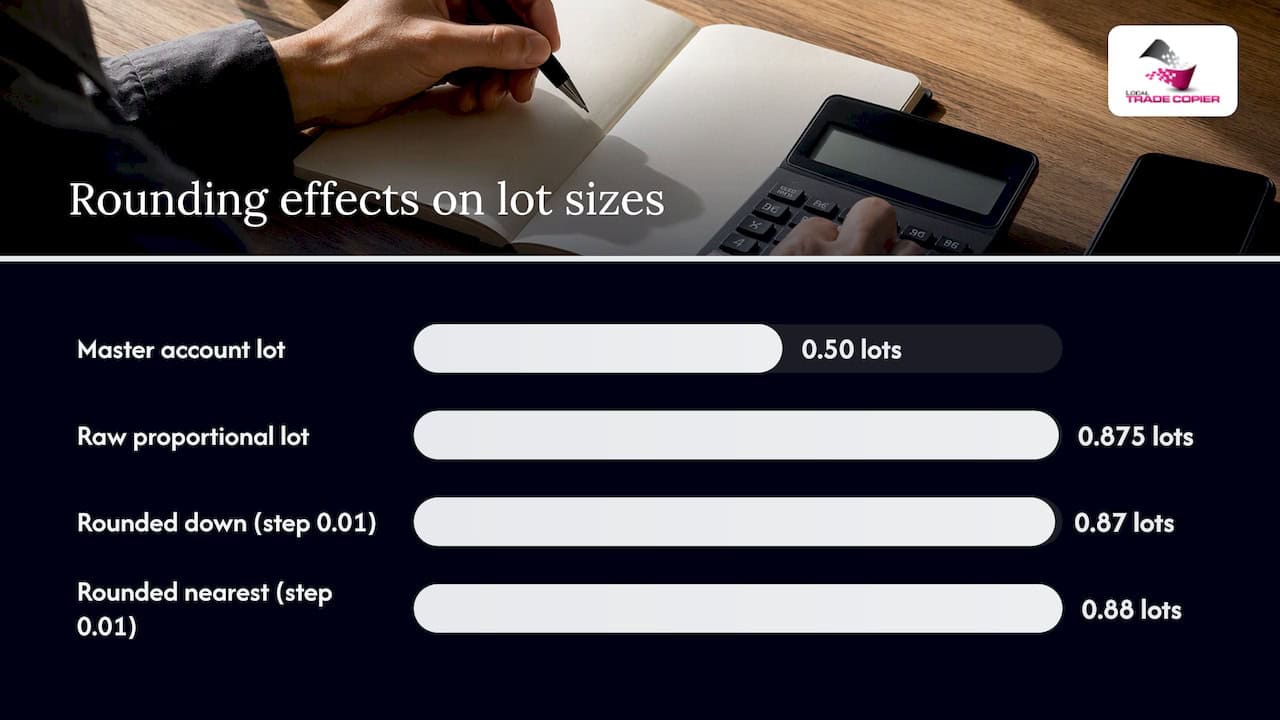
The core formula stays the same across platforms: client_lot = (client_balance / master_balance) × master_lot. A second worked example is a master account trading 0.50 lots with a certain balance and a client account holding a higher balance, where the client lot size is computed using proportional scaling before normalization and rounding.
That raw figure almost never survives contact with a broker’s symbol specifications. The MQL5 documentation on symbol volume defines the fields that govern what a broker will actually accept, and a result has to be normalized against them before it’s sent.
- Round to the nearest allowed SYMBOL_VOLUME_STEP increment (commonly 0.01, sometimes 0.10 on certain instruments).
- Compare against SYMBOL_VOLUME_MIN and bump up to the minimum if the calculated lot falls below it.
- Cap against SYMBOL_VOLUME_MAX or split the order if the figure exceeds it.
- Check SYMBOL_VOLUME_LIMIT for cumulative open-volume restrictions in one direction.
For the 0.875 example, rounding down to the nearest 0.01 step gives 0.87 lots; rounding to the nearest step gives 0.88. Pick one rounding rule and apply it consistently rather than switching case by case.
Pro Tip: Round down rather than to the nearest step when running multiple client accounts, since consistent under-allocation is easier to reconcile than occasional over-exposure.
Before going live, work through a short checklist: choose balance or equity as the baseline, set the allocation percentage, fix the rounding rule and a minimum-lot fallback, decide whether SplitLots is needed for large orders, and run the full sequence on a demo account. Our auto lot sizing guide for MT4 walks through the same formula with additional safety steps.
Platform limits, volume steps, and order-check behavior that break naive proportional sizing
A proportional calculation that ignores broker-side constraints produces rejected orders. The MQL5 symbol volume reference specifies four fields every copier needs to respect: SYMBOL_VOLUME_MIN (the smallest tradable size), SYMBOL_VOLUME_STEP (the increment between valid sizes), SYMBOL_VOLUME_MAX (the largest single-order size), and SYMBOL_VOLUME_LIMIT (a cap on total open volume in one direction, which is sometimes zero, meaning no limit applies).
Order filling policy adds another layer. Fill or Kill (FOK) rejects the entire order if it can’t be filled at the requested volume, Immediate or Cancel (IOC) fills whatever portion it can and cancels the rest, and Return leaves the remainder working. The MetaTrader5 order_check function lets a copier validate a prepared volume against margin, balance, and filling policy before the order is actually sent.
- A volume that isn’t a multiple of SYMBOL_VOLUME_STEP triggers an invalid-volume rejection, fixed by rounding to the nearest valid step.
- A volume below SYMBOL_VOLUME_MIN fails outright, which calls for a minimum-lot fallback rule.
- A volume above SYMBOL_VOLUME_MAX needs splitting into multiple orders rather than one oversized attempt.
Practical copier configurations and real-world tips
The proportional math can be handled through automatic lot scaling tied to each client account’s balance, so the calculation runs per account without manual recalculation after every master trade, using practical position-sizing methods and calculators that complement proportional-lot calculations. Rounding mode can be selectable, and SplitLots can break an oversized result into multiple orders that respect each broker’s SYMBOL_VOLUME_MAX, with a configurable minimum-lot fallback for accounts too small to receive a meaningful proportional share.
Prop-firm users face an added constraint: many funded programs prohibit automated or EA-style trading. Some software options place copied trades so they appear to have been entered by hand, and local execution on a Windows machine or VPS rather than routing through a cloud server can avoid a shared external IP address linking multiple funded accounts together.
- Set the baseline (balance or equity) per client account, not globally, since mixed account types often need different treatment.
- Verify symbol specifications on every broker involved, since SYMBOL_VOLUME_STEP and minimums vary even for the same instrument.
- Run order_check programmatically or through the copier’s built-in validation before committing to live trading.
Pro Tip: Test with the smallest realistic lot size first on a funded or prop account, since a rejected order on a live account can trigger risk flags that a demo environment won’t reveal.
A short testing protocol: run proportional scaling on demo accounts across at least two different brokers, confirm calculated volumes against each symbol’s published limits, then move to small-scale live tests before scaling up allocation percentages.
Troubleshooting: common failures and how to fix them
Most proportional sizing errors trace back to a mismatch between the calculated lot and what a specific broker will accept.
- Invalid volume or “exceeds maximum” errors: check SYMBOL_VOLUME_STEP and SYMBOL_VOLUME_MAX for that symbol and apply SplitLots to break large orders into accepted sizes.
- Partial fills: review the order filling policy (FOK, IOC, or Return) and adjust order size or filling type to match what the broker supports.
- Margin or insufficient funds: switch to equity-proportional scaling as a fallback and monitor margin usage in real time, since this is a capital-risk concern and past results do not guarantee future performance.
- Latency or timeouts: run the copier on a local machine or VPS rather than a cloud service, and review execution logs to confirm trades were actually sent at the expected volume.
Author perspective: practical rules of thumb from an experienced copier developer
Three rules hold up across most setups. Pick one baseline, balance or equity, and stay with it rather than switching mid-strategy. Test every configuration on a demo account across the actual broker pairs involved, not just one. Default to conservative rounding with a minimum-lot fallback, since an under-sized copy is a smaller problem than a rejected order on a funded account.
— Rimantas
How Local Trade Copier implements proportional lot sizing
This software is designed to handle the proportional math automatically: lot scaling per client account balance, selectable rounding modes, SplitLots for oversized orders, manual-like trade entry for prop-firm accounts, and cross-platform copying between MT4 and MT5, running locally for sub-1-second execution.

Our installation guide covers setup on Windows or VPS, the demo video shows SplitLots and proportional scaling in action, and the pricing page lists the PERSONAL, MANAGER, and VIP plans along with the 7-day free trial.
This article is general information, not a substitute for advice from a qualified financial advisor. Consult a qualified financial professional about your own circumstances before acting on anything here.
FAQ
What is proportional lot sizing in trade copying?
Proportional lot sizing scales each copied trade’s volume to match a client account’s balance or equity relative to the master account, rather than copying the exact same lot size everywhere. It keeps risk and exposure proportionate across accounts of different sizes.
How do you calculate a proportional lot size?
The standard formula is client balance divided by master balance, multiplied by the master’s lot size, then rounded to match the broker’s SYMBOL_VOLUME_STEP. An equity-based variant substitutes equity for balance when floating profit or loss matters.
Why does my copier reject a calculated lot size?
A calculated volume gets rejected when it doesn’t align with the broker’s SYMBOL_VOLUME_STEP, falls below SYMBOL_VOLUME_MIN, or exceeds SYMBOL_VOLUME_MAX, as defined in the MQL5 symbol volume documentation. Running the volume through order_check before sending it catches these mismatches in advance.
Does leverage affect proportional lot sizing between accounts?
Yes, when the master and client accounts carry different leverage, the same lot size requires different margin on each, which changes how much volume an account can safely support. This is why checking available margin and running equity-proportional calculations alongside balance-proportional ones helps avoid margin calls; past results do not guarantee future performance.
Can prop-firm accounts use proportional lot sizing safely?
Many prop firms restrict automated trading, so a local copier with a manual-like trade entry option helps copied trades appear hand-placed rather than EA-generated. Running the software locally rather than through a cloud service also avoids a shared IP address across multiple funded accounts.
