

TL;DR:
- MT4 remains popular due to its simplicity, extensive EA library, and broker support.
- MT5 offers faster backtesting, multi-asset support, and advanced order types but faces EA migration barriers.
- Many traders use both platforms to leverage MT4’s familiarity and MT5’s technical advantages.
MT5 has not replaced MT4. Despite being the newer platform, MT5 has not pushed MT4 into retirement, and that surprises many traders who assume newer always means better. MT4 remains preferred for its simplicity, hedging support, vast EA library, and broker availability. The reality is that both platforms serve distinct purposes, and choosing the wrong one for your trading style can cost you in execution speed, strategy compatibility, or risk management flexibility. This article breaks down the real technical differences between MT4 and MT5 so you can make a sharper, more informed decision.
Key Takeaways
| Point | Details |
|---|---|
| Performance upgrade | MT5 is faster and more efficient due to its 64-bit, multi-threaded architecture. |
| Order management flexibility | MT5 supports both hedging and netting, while MT4 supports only hedging. |
| Expanded market access | MT5 allows trading stocks and futures, in addition to forex and CFDs. |
| Programming and EA differences | MT5 uses advanced MQL5, incompatible with MT4’s MQL4, requiring EA migration. |
| Trader adoption reasons | MT4 remains popular due to its simplicity, EA library, and FX broker support. |
Platform architecture and performance
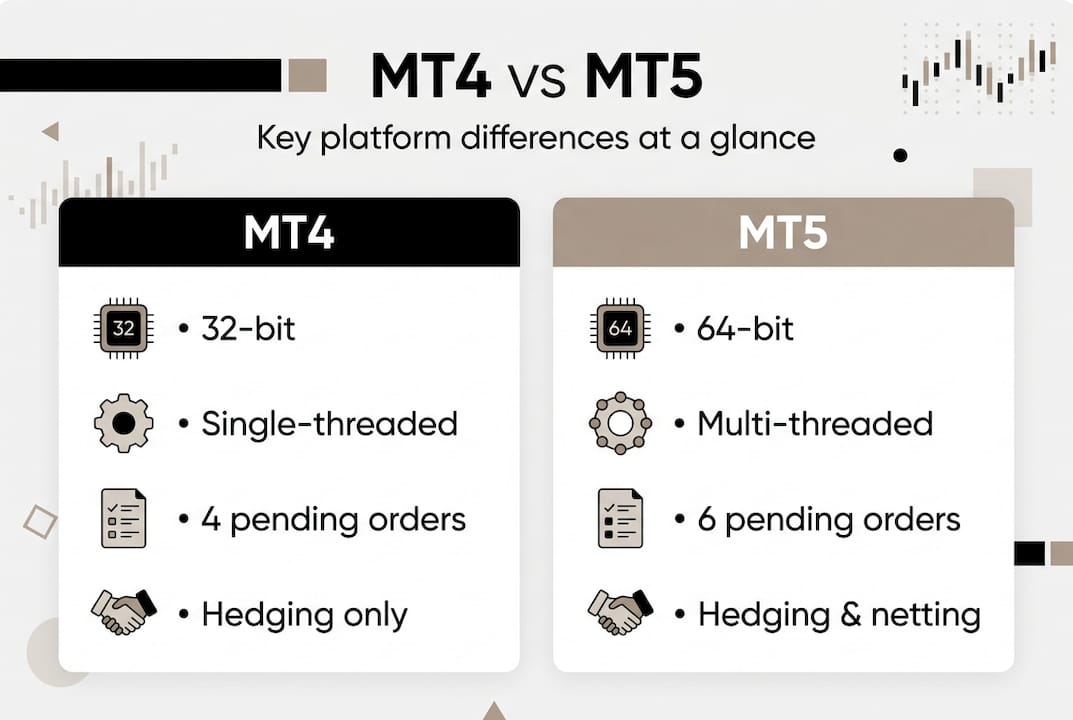
The foundation of any trading platform is its architecture, and this is where MT4 and MT5 diverge sharply. MT4 was built on a 32-bit single-threaded architecture, while MT5 runs on a 64-bit multi-threaded system. In plain terms, MT4 processes tasks one at a time. MT5 can handle multiple tasks simultaneously, which matters when you are running complex EAs or backtesting strategies.
The performance gap becomes obvious in the strategy tester. MT5’s backtesting engine is up to 20x faster than MT4’s single-threaded tester for MQL5 programs, and roughly 2 to 3 times faster in standard backtesting scenarios. If you optimize EAs frequently, this is not a minor detail. A test that takes 40 minutes on MT4 might finish in under 5 minutes on MT5.
For live trading, the multi-threaded design in MT5 also means better CPU utilization on modern hardware. MT4 can only use one processor core effectively, which becomes a bottleneck on machines running multiple terminals. MT5 scales better across cores, making it more reliable for account managers running several accounts simultaneously.
| Feature | MT4 | MT5 |
|---|---|---|
| Architecture | 32-bit, single-threaded | 64-bit, multi-threaded |
| Backtesting speed | Baseline | Up to 20x faster |
| CPU core usage | Single core | Multi-core |
| Hardware compatibility | Broad, older systems | Modern systems preferred |
For an in-depth platform comparison covering performance benchmarks, the technical gap is well documented.
Pro Tip: If your strategy relies on fast EA optimization cycles, MT5 is the clear winner. But if your broker only supports MT4 and your EA library is already built out, the speed advantage alone may not justify a full migration. Focus on avoiding slippage with MT4 and MT5 by matching your platform choice to your execution needs first.
Position accounting and order types
Having established the underlying tech, let’s look at how both platforms manage positions and orders, a crucial factor for any trader.
MT4 supports only hedging position accounting, while MT5 supports both hedging and netting. This single difference has caused real headaches for traders who switched platforms without realizing the implications. In hedging mode, you can hold simultaneous buy and sell positions on the same instrument. In netting mode, a new trade in the opposite direction reduces or closes your existing position.
For traders running grid strategies or complex hedging setups, MT4’s hedging-only model feels natural. For institutional-style traders or those copying to accounts at US brokers with FIFO rules, netting in MT5 can actually be an advantage. Understanding MT4 and MT5 position accounting before you copy trades across platforms is essential to avoid unexpected position closures.
Order type support also differs. MT4 offers 4 pending order types, while MT5 offers 6, adding Buy Stop Limit and Sell Stop Limit. These two extra types let you set a price ceiling or floor before a stop order activates, giving you tighter control over entries in volatile markets.
Here is a quick breakdown of pending order types across both platforms:
- Buy Limit (both platforms)
- Sell Limit (both platforms)
- Buy Stop (both platforms)
- Sell Stop (both platforms)
- Buy Stop Limit (MT5 only)
- Sell Stop Limit (MT5 only)
| Accounting mode | MT4 | MT5 |
|---|---|---|
| Hedging | Yes | Yes |
| Netting | No | Yes |
| Pending order types | 4 | 6 |
If you are currently on MT4 and need netting mode for MT4 or want to explore hedging strategies in forex, understanding these mechanics before you automate anything will save you significant trouble. Review order types and position handling carefully when evaluating brokers.
Pro Tip: When migrating an EA from MT4 to MT5, always verify which accounting mode your MT5 broker account uses. An EA built for hedging will behave unpredictably in netting mode and could trigger unintended trade closures.
Built-in features and supported assets
With position mechanics covered, let’s see how each platform supports different trading assets and provides analytic tools.

The analytical depth between the two platforms is significant. MT4 offers 9 timeframes and 30 built-in indicators, while MT5 expands this to 21 timeframes and 38 built-in indicators. For traders who rely on multi-timeframe analysis, MT5’s additional timeframes, including M2, M3, M4, M6, M10, M12, H2, H3, and H6, fill gaps that MT4 traders typically work around with custom indicators.
Asset coverage is where MT5 makes its strongest case. MT4 is forex and CFD focused, while MT5 natively supports stocks, futures, and options alongside forex and CFDs. If you want to trade equities or futures from the same terminal where you manage your forex positions, MT5 is the only option without third-party workarounds.
Here is a feature snapshot:
- Timeframes: MT4 has 9, MT5 has 21
- Built-in indicators: MT4 has 30, MT5 has 38
- Asset classes: MT4 covers forex and CFDs, MT5 adds stocks, futures, and options
- Economic calendar: Built into MT5, not available natively in MT4
- Depth of market: Available in MT5, limited in MT4
| Feature | MT4 | MT5 |
|---|---|---|
| Timeframes | 9 | 21 |
| Built-in indicators | 30 | 38 |
| Stocks and futures | No | Yes |
| Economic calendar | No | Yes |
| Depth of market | Limited | Full |
For traders copying across platforms, the MT4 to MT5 copy setup becomes relevant when you want to run a master account on one platform and replicate trades to accounts on the other. The new MT5 copier release also supports cross-platform scenarios including copying forex and gold between terminals. Check the MT4 vs MT5 features breakdown for a full technical reference.
Programming languages and EA compatibility
Finally, let’s examine how programming and automation capabilities differ, and why EA compatibility shapes platform preference.
MT4 uses MQL4, a procedural scripting language that is straightforward to learn and has been around long enough to build an enormous community library. MT5 uses MQL5, which is object-oriented and more powerful but fundamentally incompatible with MQL4. You cannot simply move an MT4 EA file into MT5 and expect it to run. It requires a full rewrite.
This incompatibility is the single biggest reason MT4 has not been replaced. Traders who have spent years building and refining MQL4 EAs are not going to abandon that investment lightly. The migration costs for EAs can be substantial, especially for complex multi-symbol strategies or EAs with proprietary logic that requires a skilled developer to reconstruct in MQL5.
Here is what the EA landscape looks like across both platforms:
- MT4 has a massive, decades-old MQL4 library with thousands of free and commercial EAs
- MT5’s MQL5 library is growing but smaller in total volume
- MQL5 supports object-oriented programming, making it more scalable for complex systems
- MQL4 EAs cannot run on MT5 without full code conversion
- Many retail traders and prop firm traders rely on MT4’s EA library for proven, battle-tested strategies
“The technical superiority of MT5 is clear, but the migration barrier is real. Most traders do not switch because their automation stack is built on MQL4, and rebuilding it in MQL5 is not a weekend project.”
For account managers running automated strategies across multiple accounts, this means your platform decision is often locked in by your EA stack. If your core strategy runs on MQL4, you stay on MT4. If you are building new automation from scratch, MQL5 gives you more power and better performance from day one.
Our take: What traders miss about MT4 and MT5
Most platform comparison guides frame this as a competition with a clear winner. We disagree. The smarter question is not which platform is better but which platform fits your current setup and where you want to go.
MT4’s staying power is not nostalgia. It is a rational response to sunk costs in EA development, broker availability, and a trading community that has spent years optimizing strategies on a platform that still works. Switching to MT5 for its own sake rarely makes sense unless you have a specific reason, such as needing multi-asset access or faster backtesting.
MT5 genuinely excels for strategy development, and faster backtesting is a real competitive edge. But migration costs for EAs hinder adoption, and dual setups are common for brokers and account managers who need to serve clients on both platforms.
The traders who get the most value are those who run both. Use MT4 for your existing EA stack and established strategies. Use MT5 for new development, multi-asset trading, and accounts where netting mode fits your risk model. Understanding MT4’s role in prop firms also reveals why the platform remains dominant in funded account environments where EA compatibility and broker support are non-negotiable.
Next steps: Choosing and integrating MT4 and MT5 tools
If you’re ready to put these insights into action, here’s how to get started with MT4 and MT5 integration tools.
Local Trade Copier lets you replicate trades across MT4, MT5, and DXTrade accounts from a single Windows machine or VPS, with sub-0.5-second local execution and no cloud routing. Whether you’re managing multiple personal accounts or copying to client accounts across platforms, it handles cross-platform scenarios without manual re-entry.
You can follow the trade copier installation guide to get set up quickly, watch the demo video to see it in action, or go straight to the MT4 to MT5 setup guide if cross-platform copying is your immediate need. A 7-day free trial is included, and the plan covers MT4, MT5, and DXTrade components under one subscription.
Frequently asked questions
What is the main difference between MT4 and MT5?
MT5 uses a 64-bit multi-threaded architecture with broader asset support and more built-in tools, while MT4 is a simpler, forex-focused platform with a massive EA library. The right choice depends on your trading style and automation stack.
Can Expert Advisors from MT4 be used on MT5?
No. MQL4 and MQL5 are incompatible, so MT4 EAs require a full code rewrite to run on MT5, not just a file transfer.
Why do many traders still use MT4?
MT4 remains preferred because of its simplicity, extensive MQL4 EA library, and wide broker support, making the cost of switching to MT5 hard to justify for traders with established automation.
What are the unique order types available in MT5?
MT5 includes six pending order types, adding Buy Stop Limit and Sell Stop Limit to the four types available in MT4, giving traders more precise entry control in volatile conditions.
Is MT5 better for multi-asset trading?
Yes. MT5 natively supports stocks, futures, and options alongside forex and CFDs, while MT4 is limited to forex and CFD instruments without third-party additions.
Recommended
- How To Use Trade Copier – mt4copier.com Blog
- Understanding MT4’s role in Forex prop firms in 2026
- Local Trade Copier Updates MT4 and MT5 Versions with New Tools for Prop Firm and Retail Traders | Trade Copier for MT4 & MT5
- How To Copy Forex & Gold Trades From MT4 to MT5 in One Click
- Trade Smarter with AI | Simple Trading Journal by TradeWise
- Trading strategijų žingsniai: kaip pasiekti gerų rezultatų
