

The ignore existing positions setting tells your copier to skip any trade already open on a receiver account and copy only new master trades going forward. Enable it when you need to add a client account mid-strategy, avoid duplicating a manual trade, or wind an account down without opening fresh risk. Leave it off when the receiver account must mirror the master’s exact exposure from the moment it connects.
TL;DR:
- Using ignore-existing is ideal when adding new client accounts, winding down positions, or avoiding conflicts with manual trades, but should be off for exact master replication.
- Proper setup involves disabling the open-on-resync option, applying filters like symbol allow-lists and magic numbers, and testing on a demo account before live deployment.
- Failures often stem from connection issues, filter mismatches, or unsupported order types, requiring thorough troubleshooting and logging of setting changes.
- Defaulting to new-trades-only maximizes safety by preventing unintended entry at wrong prices when reconnecting or resyncing accounts.
- Trade copier software with local execution offers flexible control to test and verify ignore-existing behavior without risking live positions.
How the Ignore Existing Positions Copier Setting Actually Works
Every trade copier makes a binary decision the moment a client account connects: open everything the master currently holds, or open nothing until the next new signal. That choice is usually controlled by a flag with a name like “Copy master positions already open at start” or “Open missing positions on resync.” Most copiers ship with this off by default, meaning new trades only, according to the Trade Copier Console manual.
When the flag is on, the client scans the master account, finds every open position, and replicates it at current market price. When it’s off, the client ignores anything already running and waits for the next trade the master opens fresh.
The copier doesn’t guess which positions are “existing.” It identifies them through a handful of matching rules:
- Magic numbers tied to the EA or strategy that opened the trade
- Trade comments attached at order entry
- Symbol mapping between master and client brokers, since one broker’s “XAUUSD” may be another’s “GOLD”
- Symbol allow-lists that restrict which instruments the copier touches at all
Magic number and comment matching are the most reliable way to keep a copier from stepping on manual trades or a separate EA running on the same account, a point echoed in the Apex Copier settings guide.
The execution consequences matter more than the mechanics. A master position opened three days ago at 1.0850 looks nothing like the market at 1.0910 today. Forcing the client to open that same trade now means entering at a materially different price, which is exactly the timing risk and price divergence that degrades the risk-reward profile on the receiving end. Copying a stale position at a fresh price changes the trade’s setup entirely.
Order type adds another wrinkle. MT5 supports stop-limit orders that MT4 does not, so a copier bridging MT4 to MT5 will refuse or translate those orders rather than force a mismatch, according to the same Trade Copier Console documentation.
When Should You Enable Ignore-Existing?
Three situations call for turning ignore-existing on:
- Adding a new receiver account mid-strategy. If the master already has six positions open and you connect a new client, opening all six at current prices means six trades entered at the wrong moment. New-trades-only keeps the new account clean.
- Winding an account down. If you’re closing out a client relationship or want an account to stop taking new risk, existing positions run to their own stop or take profit while the copier opens nothing new. This is often labeled a “soft landing” toggle, and it lets running trades finish naturally instead of forcing an abrupt cutoff.
- Avoiding conflicts with manual trades. A trader who manually opens positions on the same account the copier manages needs the copier to leave those alone rather than treat them as something to reconcile.
Leave ignore-existing off when you’re running managed-account continuity, where the client account’s entire purpose is mirroring the master’s exposure at all times. A funded account meant to shadow a strategy exactly can’t afford gaps between what the master holds and what the client holds.
Account type matters too. Netting accounts on FOREX.com-style FIFO rules behave differently than hedging accounts, and broker-specific symbol mapping or lot-size floors can silently block a trade you expected to copy.
Pro Tip: If you’re unsure which way to set it, default to new-trades-only. It’s the safer failure mode: worst case, you miss replicating a position you actually wanted copied, rather than opening six trades at prices you never intended to pay.
How Do You Set Up and Test Ignore-Existing?
Configuring this correctly takes about ten minutes, most of it spent verifying rather than clicking settings.
Step 1: Locate the master-position control. Find “Copy master positions already open at start” or “Open missing positions on resync” in your copier’s settings panel and set it to false.
Step 2: Enable soft landing if you’re winding down. This lets existing copied positions keep running to their natural close while blocking any new trade from opening.
Step 3: Refine detection with filters.
- Symbol allow-list to restrict which instruments copy at all
- Magic number blocks to exclude specific EAs or strategies on the master
- Min/max master lot filters to ignore trades outside a size range
Step 4: Cap execution risk. Set a maximum slippage and a maximum spread. Some copiers also support a “skip if price already ran N points” rule, which refuses to join a trade that’s moved too far from its original entry, according to the Apex Copier settings guide.
Step 5: Test before trusting production.
- Run the entire sequence on a demo account first.
- Open a small trade on the master before starting the client terminal.
- Start the client with ignore-existing toggled on.
- Check the message panel to confirm the trade was skipped, not queued.
- Perform a [resync test](https://mt4copier.com/rebooting-local-trade-copier client-and-server-with-open-positions) by restarting both terminals and confirming no duplicate opens on reconnect.
One detail worth flagging: a demo test with a single small trade catches most configuration mistakes before they reach a live account, because the message panel exposes filter reasons in plain text rather than failing silently.
Why Isn’t the Copier Ignoring Existing Positions Correctly?
Most failures show up as one of three message-panel patterns.
- No line at all. The client isn’t connected to the master. Check that both terminals show LIVE status and that the shared folder or bridge path points to the correct master account number.
- “Filtered out by symbol/magic/comment/size.” The copier saw the trade and deliberately skipped it. This is usually correct behavior, not a bug, but confirm the filter matches what you intended.
- Explicit refusal for unsupported order types. Stop-limit orders crossing an MT5-to-MT4 bridge get rejected outright rather than silently dropped, which is the safer failure mode.
If duplicates still appear after you’ve set ignore-existing to false, check whether open-on-resync got re-enabled during a restart. Symbol mapping mismatches between brokers cause a similar issue: the copier thinks it’s a new symbol it hasn’t seen, so it opens what looks like a fresh trade.
Pro Tip: Keep a small log of every settings change you make, with a timestamp. When something copies unexpectedly three weeks later, that log tells you whether it’s a new bug or an old setting nobody remembered switching back.
Why New-Trades-Only Is the Right Default
New-trades-only is the safer default for most traders, and prop-firm users in particular, because it removes the one variable nobody can control: what price the market happens to be at the moment a client account connects. Opening every existing master position at resync feels thorough, but it quietly substitutes “matched exposure” for “matched entry,” and those are not the same thing once price has moved.
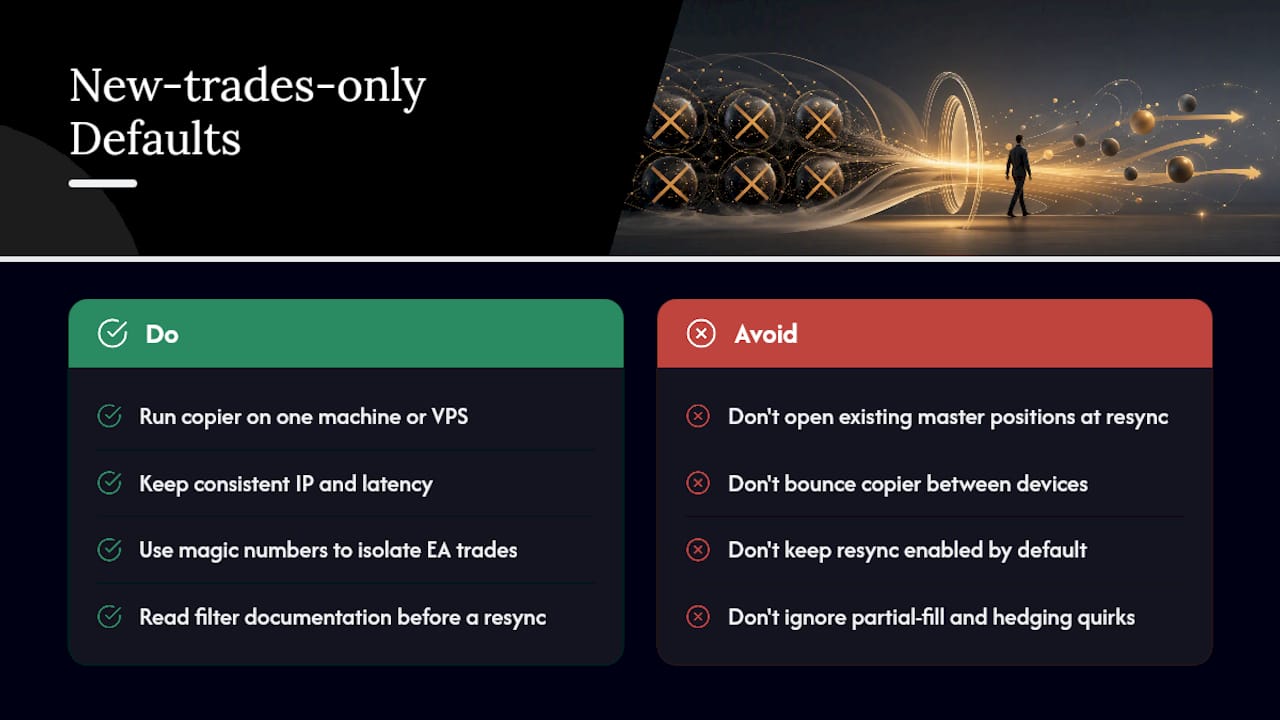
Run your copier on a single machine or VPS rather than bouncing between devices. Consistent IP and latency matter more than people expect, especially for prop-firm setups where execution consistency is part of the requirement. Use magic numbers deliberately to isolate EA trades from manual ones on the same account, and keep resync off unless you have a specific reason to catch up on missed positions.
The edge cases (partial fills, hedging accounts, cross-broker symbol quirks) are exactly what filter documentation exists to solve. Read it before you need it, not after a resync opens six trades you didn’t plan for.
— Rimantas
Test This Setting Yourself with Local Trade Copier
Trade copier software gives you direct control over this exact behavior instead of forcing a one-size-fits-all resync rule on every account you run. It supports local execution across MT4, MT5, and DXTrade, with filtering options such as symbol allow-lists, magic number blocks, lot-size floors, and slippage caps as configurable settings.

Everything runs on your own Windows machine or VPS, so execution stays local with no cloud routing between master and client accounts. If you want to see the ignore-existing behavior before touching a live account, the demo video walks through the exact settings covered here. Local Trade Copier gives you control over trade copying behavior and applies its own filtering or strategy layer. Past performance is no guarantee of future results. Start the 7-day free trial and toggle new-trades-only against your own master account before you decide anything.
Sources
Recommended
- Set Trade Copier to Accept or Ignore open/modify/close
- How to Set Trade Copier to NOT close or Touch Certain Trades
- Rebooting Local Trade Copier client and server with open positions
- Copy Or Exclude Positions By Trade Comments
