

TL;DR:
- Automating MT4 account synchronization reduces errors, slippage, and missed trades compared to manual copying.
- Trade copier software with master-slave architecture allows real-time trade replication across multiple accounts.
- Using a VPS and proper setup ensures reliable 24/7 synchronization with minimal latency.
Managing multiple MetaTrader 4 accounts manually is one of the fastest ways to introduce costly errors into your trading. You open a position on one account, then scramble to replicate it across two, three, or five others — and by the time you finish, the market has moved. Slippage, missed entries, and inconsistent lot sizes pile up fast. The good news is that automated synchronization eliminates all of that. This guide walks you through everything: what synchronization actually means, the tools you need, a step-by-step setup process, troubleshooting fixes, and expert insights to help you run a tighter, more confident multi-account operation.
Key Takeaways
| Point | Details |
|---|---|
| Automation reduces risk | Synchronizing MT4 accounts with a trade copier eliminates errors and delays from manual trade management. |
| Right tools are essential | A reliable copier, proper VPS, and account permissions ensure consistent syncing performance. |
| Step-by-step setup works | Following structured configuration steps enables seamless master-to-slave trade replication. |
| Test and monitor regularly | Demo testing and periodic checks help you avoid synchronization errors and performance issues. |
Understanding MT4 account synchronization and its challenges
At its core, MT4 account synchronization means automatically replicating every trade action from one “master” account to one or more “slave” (or client) accounts in real time. When you open, modify, or close a position on the master, the same action fires on every linked account without you lifting a finger. That’s the goal. The reality of doing this manually is far messier.
Manual synchronization means switching between terminals, calculating lot sizes on the fly, and hoping you don’t fat-finger an entry. Even experienced traders miss trades during fast markets. A single missed stop-loss on a slave account can wipe out a week of gains. The risks compound quickly when you’re managing accounts across different brokers or time zones.
Legacy tools like MT4’s built-in MultiTerminal or broker-managed MAM/PAMM systems were designed for a different era. MultiTerminal requires you to manually allocate lots across accounts. MAM and PAMM systems lock you into your broker’s infrastructure, limiting flexibility and customization. They work for basic allocation but fall short when you need precise, rule-based replication with custom lot sizing per account.
Modern trade copiers solve this with a master-slave architecture. The primary method to synchronize MT4 accounts is trade copier software, where the master broadcasts signals and each slave account executes independently. This scales from one master to multiple clients without any manual intervention.
Here’s what manual synchronization costs you:
- Execution delays: Even 5-10 seconds of lag can mean a worse fill price
- Human error: Wrong lot size, wrong symbol, wrong direction
- Missed trades: Fast news events don’t wait for you to click
- Emotional interference: Hesitation on a slave account that didn’t exist on the master
“The difference between a 2-second manual copy and a sub-second automated copy isn’t just speed — it’s the compounding effect of hundreds of trades executed at the right price versus slightly off.”
Modern trade copier latencies on local setups run well under 0.5 seconds, making automation the only practical choice for serious multi-account traders.
What you need: Trade copier software, hardware, and account prerequisites
Before you touch a single setting, you need the right environment. Rushing into setup without checking compatibility is the number one reason traders hit walls on day one.

Software options at a glance:
| Software | Type | Latency | Rating |
|---|---|---|---|
| Local Trade Copier | Local/VPS | Under 0.5ms | 4.9/5 (491 reviews) |
| Duplikium | Cloud | 1-3ms | 4.7/5 |
| Copygram | Cloud | 5-50ms | 4.5/5 |
| Social Trade Hub | Multi-platform | Varies | 4.3/5 |
Local copiers deliver under 0.5-10ms latency when running on the same machine or VPS, while cloud-based solutions can reach 100ms or more depending on server location and load. For prop firm traders especially, local execution also means your trades never leave your machine’s IP address — a critical advantage.
Hardware requirements:
- Windows PC or VPS (Windows Server 2016 or later recommended)
- Minimum 4 CPU cores, 8GB RAM for running multiple MT4 terminals simultaneously
- Stable internet connection with low ping to your broker’s servers
- Enough screen resolution or virtual desktop space to run multiple terminals
Account and platform prerequisites:
- At least one MT4 master account with full EA trading permissions enabled
- One or more MT4 (or MT5/DXTrade) slave accounts, each with “Allow automated trading” checked
- Broker(s) that permit Expert Advisors and do not restrict third-party software
- Login credentials for each account loaded into separate MT4 terminals
Pro Tip: If you’re running more than three slave accounts, a dedicated VPS is not optional — it’s essential. Your home PC sleeping, restarting for updates, or losing power will break synchronization at the worst possible moment. Review the full trade copier installation steps before choosing your VPS specs.
Cloud copiers are simpler to start but introduce latency, dependency on external servers, and potential IP exposure for prop firm accounts. Local copiers require slightly more setup but give you full control, faster execution, and no ongoing cloud routing risk.
Step-by-step: How to synchronize MT4 accounts using a trade copier
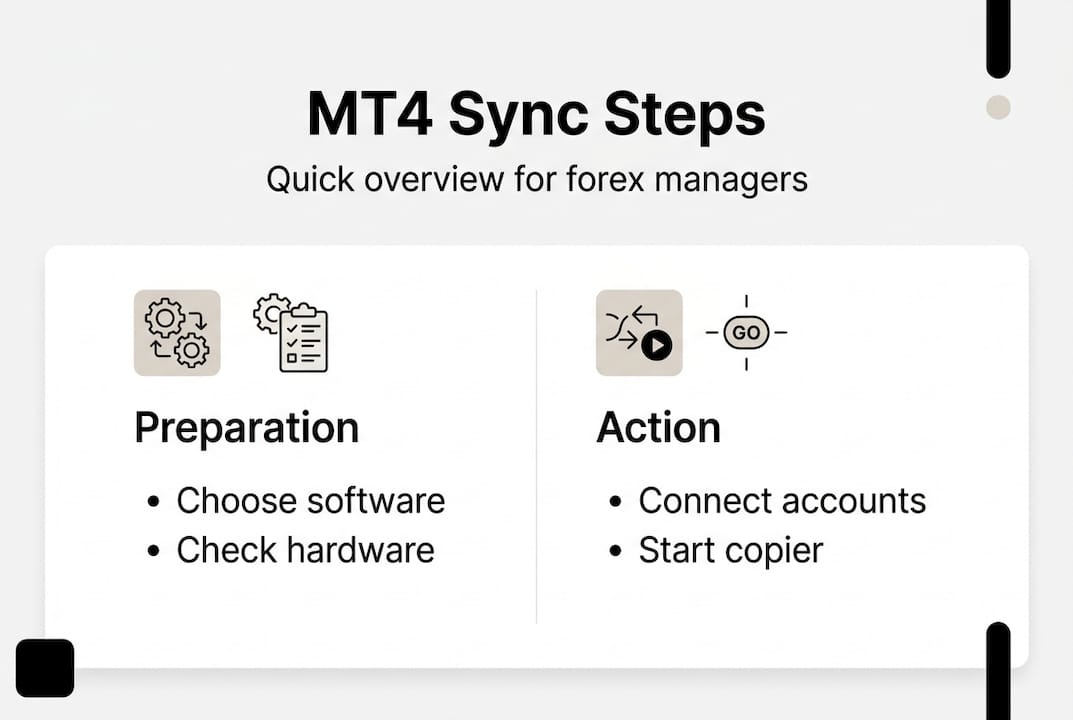
With your environment ready, here’s exactly how to get synchronization running using a local trade copier like Local Trade Copier.
- Download and install the software. Get the trade copier package from the provider’s website. Local Trade Copier installs as an Expert Advisor (.ex4 file) directly into your MT4 data folder.
- Set up your master terminal. Open MT4 on your master account. Attach the Sender EA to any chart (currency pair doesn’t matter). Enable “Allow live trading” in the EA settings.
- Set up each slave terminal. Open a separate MT4 instance for each slave account. Attach the Receiver EA to a chart in each terminal. Point it to the same local folder as the Sender.
- Configure lot sizing rules. Choose from fixed lots, proportional scaling, or balance-based scaling for each slave. This is where you customize risk per account independently.
- Verify the connection. Check the EA comment section in each terminal for a green status indicator. The Sender should show “Sending” and each Receiver should show “Connected.”
- Run a test trade. Place a small trade on the master account and confirm it appears on all slave accounts within under a second. Use a demo account first.
- Go live. Once test trades replicate cleanly, switch all terminals to live accounts.
The master-slave architecture means every action on the master fires automatically across all slaves. You can also copy from selected MT4 accounts rather than all accounts, giving you precise control over which slaves receive which signals.
Local vs. cloud setup comparison:
| Factor | Local copier | Cloud copier |
|---|---|---|
| Setup complexity | Moderate | Low |
| Latency | Under 0.5ms | 1-100ms+ |
| IP exposure risk | None | Possible |
| Monthly cost | Subscription | Subscription |
| 24/7 reliability | VPS required | Provider-dependent |
One underused feature: you can copy open trades from the master at the moment you connect a new slave, so existing positions sync immediately rather than waiting for the next new trade. Traders consistently highlight this in user reviews as a key time-saver.
Pro Tip: Always test your full setup on demo accounts for at least 48 hours before going live. This catches firewall issues, permission errors, and lot-size mismatches before real money is involved.
Troubleshooting, testing, and avoiding common mistakes
Even a well-configured setup can run into issues. Knowing what to look for saves hours of frustration.
Most common problems and fixes:
- Trades not copying: Check that “Allow automated trading” is enabled on both the platform toolbar and within each EA’s settings. A single unchecked box stops everything.
- Firewall blocking the copier: Add your MT4 executable and the copier folder to your Windows Firewall exceptions. VPS providers sometimes have additional network-level firewalls to configure.
- Slave account receiving wrong lot sizes: Double-check your lot scaling mode. If you’re using balance-based scaling, confirm the slave account balance is correctly read by the EA.
- Intermittent disconnections: This almost always points to VPS resource limits. If RAM usage exceeds 80%, terminals start dropping. Upgrade your VPS or reduce the number of open charts per terminal.
- Trades copying with a delay: Check that all terminals are on the same machine or VPS. Any cross-network copying introduces latency that defeats the purpose of a local setup.
The Local Trade Copier is trusted by thousands of traders running high-frequency setups, and most reported issues trace back to permissions or firewall settings rather than the software itself.
“Before contacting support, always check three things first: EA permissions, Windows Firewall settings, and whether ‘Allow DLL imports’ is enabled in MT4’s options.”
For deeper diagnosis, review your troubleshooting copier issues guide, which covers the most frequent failure points with step-by-step fixes. If you’re also thinking about cost efficiency, there are ways to reduce trade copying costs without sacrificing performance.
One risk worth flagging: copying trades across brokers with different execution models (ECN vs. market maker) can produce inconsistent fills. Always verify that your slave broker’s spread and execution speed are compatible with your strategy before scaling up. Understanding how to hedge forex risk automation can also help you manage exposure when running multi-broker setups.
Pro Tip: Set up a trade log review routine every Monday morning. Comparing master and slave trade histories side by side catches silent sync failures before they become expensive.
Expert perspective: Why automation beats manual syncing every time
Here’s the uncomfortable truth most traders don’t want to hear: if you’re still manually copying trades across accounts, you’re not managing risk — you’re creating it. Every second of delay between your master execution and your slave replication is a window for the market to move against you. At scale, those windows add up.
The trade copier advantage over MultiTerminal isn’t just about speed. It’s about removing the human element from a process that humans are genuinely bad at under pressure. MAM and PAMM systems lock you into your broker’s rules and offer no flexibility for custom lot sizing, symbol mapping, or cross-platform replication. Trade copiers give you all of that.
What we’ve seen over years of working with retail traders and account managers is that the biggest gains from automation aren’t in the technology itself — they’re in the mental clarity it creates. When you know every slave account mirrors the master exactly, you stop second-guessing entries. You stop hesitating. You trade the strategy, not the logistics.
For beginners, a solid set of forex copier tips can shortcut months of trial and error. For experienced account managers, automation is simply the only way to scale beyond three or four accounts without losing consistency.
Connect your trading accounts seamlessly with Local Trade Copier
If you’re ready to stop managing accounts manually and start running a synchronized, automated operation, Local Trade Copier is the most established locally-installed solution available — active since 2010 with 3,000+ users and a 4.9/5 rating on Trustpilot.
The setup is straightforward. Follow the Local Trade Copier installation guide to get your master and slave terminals connected in under an hour. If you want to see exactly how it works before committing, watch demo video for a full walkthrough of the interface and trade replication in action. And if you hit any snags, the troubleshooting tips page covers every common issue with clear fixes. A 7-day free trial means you can verify the setup works for your specific accounts before spending a dollar.
Frequently asked questions
What is the main advantage of using a trade copier over manual synchronization?
A trade copier automates all trade replication instantly, eliminating the delays and errors that come with manual copying. The master-slave architecture means every action on the master fires across all slave accounts without any human input.
Do I need a VPS to synchronize MT4 accounts 24/7?
Yes. A VPS with at least 4 cores and 8GB RAM is the recommended minimum for running multiple MT4 terminals continuously without interruption.
Which trade copier software is rated highest by traders?
Local Trade Copier holds a 4.9/5 from 491 reviews on Trustpilot, making it the top-rated locally-installed option among active forex traders.
Can MT4 accounts on different brokers be synchronized?
Yes. Most advanced trade copiers, including Local Trade Copier, support cross-broker MT4 and MT5 synchronization as long as both brokers allow Expert Advisor operations on the account.
Recommended
- Copy Forex trades from one MT4 master into 3x MT4 clients
- How to Copy Trades Between Two or More MT5 Trading Accounts
- How To Copy Trades From Selected MetaTrader 4 Master Accounts
- Adding Master Account To Existing MT4 Trade Copier Setup [Checklist included]
- FX Exposure Management | FX Risk and Exposure – CorpHedge – CorpHedge
- Reduce corporate forex risk: Advanced strategies for profit protection
