

Fix a contract size mismatch by matching the underlying specifications between your master and client accounts, specifically CONTRACT SIZE, LOTSTEP, MINLOT/MAXLOT, and pip or tick definitions, then letting your trade copier normalize or risk-scale the lot size automatically instead of copying volume 1:1.
The fastest path: open the symbol Specification window in MT4, MT5, or DXTrade for both accounts, compare CONTRACT SIZE and LOTSTEP side by side, and if they differ, apply a mapping table or proportional scaling rule in your copier before you copy another trade.
- Check Specification (right-click the symbol in Market Watch) on both accounts.
- Compare CONTRACT SIZE, MINLOT, MAXLOT, LOTSTEP, and deposit currency.
- If any value differs, switch from fixed-lot copying to proportional or risk-based scaling.
- Tools like Local Trade Copier handle this with built-in lot normalization across MT4, MT5, and DXTrade.
Key Takeaways
Fixing a contract size mismatch requires comparing CONTRACT SIZE, LOTSTEP, and MINLOT/MAXLOT between accounts, then applying lot normalization or risk-based scaling instead of copying raw volume.
| Point | Details |
|---|---|
| Check Specification first | Compare CONTRACT SIZE, MINLOT, MAXLOT, and LOTSTEP on master and client before changing any copier setting. |
| Use the right formula | Risk-based sizing uses Lot Size = Risk Amount ÷ (Stop Loss Pips × Pip Value); proportional scaling uses the contract-size and balance ratio. |
| Always normalize and clamp | Round to LOTSTEP and clamp to MAXLOT so the copier never sends an invalid order. |
| Test on demo before going live | Run one micro-lot trade, check the log entry, and confirm pip value matches before enabling live copying. |
| Local Trade Copier automates this | It offers mapping tables, proportional and risk-based scaling, and MINLOT/MAXLOT/LOTSTEP checks across MT4, MT5, and DXTrade. |
What Is a Contract Size Mismatch in Trade Copying?
A contract size mismatch happens when the master account and one or more client accounts disagree on how much underlying asset a single lot represents, or on the minimum step by which volume can change. Copy a 1.00 lot trade from a master where CONTRACT SIZE is 100,000 units to a client where it’s set at 10,000, and you’ve just replicated a position ten times too small (or too large, depending on direction). The trade still executes. The lot size, the risk, and the resulting profit or loss per pip are all wrong.
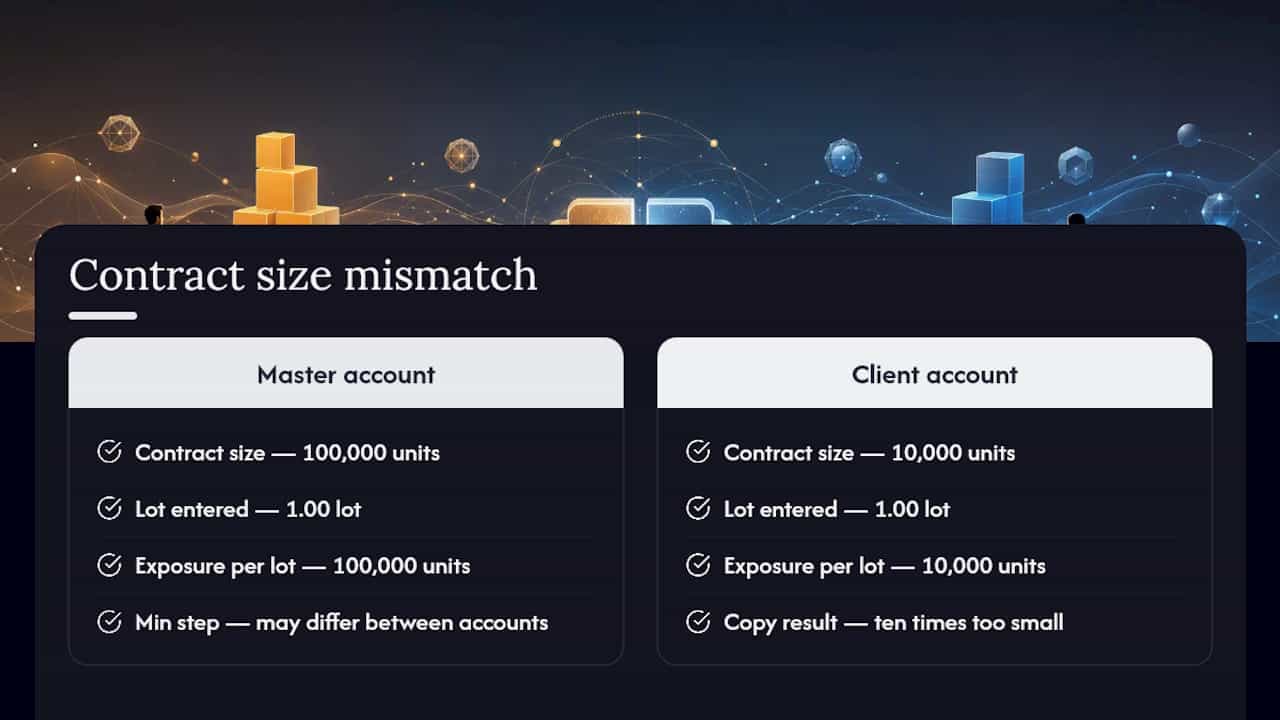
This is different from a symbol-naming mismatch (where “XAUUSD” on one broker is “GOLD” on another) or a general lot size vs contract size confusion, where traders conflate the volume they type into an order ticket with the actual contract specification behind it. Lot size is the number you enter. Contract size is what that number multiplies against. A contract size discrepancy between two brokers means the same lot number produces two very different exposures.
How Do You Detect a Contract Size Mismatch?
You’ll usually spot a mismatch through symptoms before you ever open a Specification window. Watch for:
- Rejected orders on the client account with unfamiliar error codes.
- Copied trades opening but volume floored to MINLOT or capped at MAXLOT.
- Profit and loss per lot on the client that doesn’t match what the master shows.
- A sudden jump in position size right after a broker announces a contract-size change.
- Log entries in your copier showing “volume adjusted” or a rounding action you didn’t configure.
To confirm it, open the master and client Symbol Specification panels in MT4 or MT5 and compare CONTRACT SIZE, MINLOT, MAXLOT, LOTSTEP, TICK SIZE or pip, and deposit currency line by line. Tickmill’s own FAQ on checking contract specifications walks through the desktop path (Market Watch, right-click, Specification) and the mobile equivalent (Quotes, then Details or Properties), which matters if you’re verifying settings away from your desk.
Then run one demo-copy test with a single micro lot and inspect the resulting client order.
Pro Tip: Don’t eyeball the lot numbers side by side. Calculate the expected pip value for that one tester trade using the lot-size formula below, then check it against what actually landed in the client account. A lot number can look “close enough” while the pip value is off by a wide margin.
What Broker and Platform Parameters Cause the Mismatch?
Several specification fields drive contract size discrepancy, and most traders only ever check one of them.
- CONTRACT SIZE. The number of underlying units one full lot represents. This is the field most responsible for size mismatch in contracts between brokers, and it’s not always 100,000 units even on major forex pairs, and metals or indices vary widely by broker.
- MINLOT and MAXLOT. The smallest and largest volume a broker will accept per order. A client account with a higher MINLOT than your intended scaled size gets floored up, silently increasing risk.
- LOTSTEP. The increment volume must move in (0.01, 0.1, 1.0). A copier that doesn’t respect LOTSTEP rounds badly.
- PIP/TICK SIZE and Pip Multiplier. Determines how price movement translates to profit per lot, separate from contract size but easy to confuse with it.
- Deposit currency. Changes how pip value converts back to your account currency, which distorts P&L even when the lot number is identical.
- Profit-calculation mode and swap type. These affect replicated P&L and rollover costs, not the lot size itself, but they explain why two “correctly sized” positions still show different results.
- Symbol name mapping. Not a numeric field, but a common source of what looks like a size mismatch when it’s actually a routing error.
MetaTrader’s own symbol specification documentation lists exactly these fields, and it’s worth reading once so you know what you’re looking at in the Specification dialog rather than guessing. DXTrade tends to present contract units in its instrument details screen rather than a single “Specification” tab, so the values are there, just organized differently.
Which Normalization Method Should You Use to Fix It?
Once you’ve confirmed a mismatch, you have five practical ways to resolve it, and the right one depends on how much precision you need versus how much setup time you’re willing to spend.
- Exact lot mapping. Build a symbol-by-symbol table matching master lots to specific client lots. Most accurate for a fixed set of instruments, but breaks the moment you add a new symbol you forgot to map.
- Proportional scaling. Scale by the ratio of contract sizes and account balances. Handles new symbols automatically, less precise than manual mapping.
- Risk-based percent-of-balance sizing. Recompute the lot size to preserve a fixed percentage of account risk regardless of contract size differences. Best for accounts with very different balances, but requires a defined stop-loss distance to calculate against.
- Clamping rules. Force any calculated lot back within MINLOT and MAXLOT bounds so the copier never sends an invalid order.
- Skip-or-split rules. When a scaled result falls below MINLOT, either skip the trade or split the master position into smaller pieces the client can still take. Professional replication setups build in exactly this kind of intelligent lot scaling, including dynamic recalculation at execution time rather than a static ratio set once and forgotten.
Each option trades accuracy against complexity. Exact mapping is the most precise but the most fragile. Risk-based sizing preserves your intended exposure best across mismatched balances, but it demands a stop-loss input, so it won’t work on strategies that don’t use one.
Pro Tip: Start with a demo mapping table for expensive symbols like indices or commodities, where a contract-size error compounds fast, and reserve risk-based scaling for volatile masters where balance ratios alone won’t protect you.
How Do You Calculate the Correct Client Lot Size?
Reconciling a mismatch is a five-step process, and it’s faster than it looks once you’ve done it once.
- Pull up master and client Symbol Specification and record CONTRACT SIZE and pip value for each.
- Confirm MINLOT, MAXLOT, and LOTSTEP on the client account.
- Calculate pip value per lot on both accounts using Pip Value = Tick Value × (Point ÷ Tick Size) × Pip Multiplier.
- Choose your formula. For risk-based sizing: Lot Size = Risk Amount ÷ (Stop Loss Pips × Pip Value). For proportional scaling: Client Lot = Master Lot × (Master Contract Size ÷ Client Contract Size) × (Client Balance ÷ Master Balance).
- Normalize the result: round to the nearest LOTSTEP, floor rather than round up if your policy favors safety, then clamp to MAXLOT.
This mirrors the open-source MT4 lot-size calculator logic, which computes risk amount as a percentage of balance and normalizes automatically to broker minimums.
Worked example: Say your master trades 1.00 lot on an index CFD with CONTRACT SIZE 50, and the client’s broker lists CONTRACT SIZE 1 for the same instrument, with a different deposit currency. The contract-size ratio alone is 50 to 1, meaning a naive 1:1 lot copy would represent 50 times less exposure than the master intended. Multiply the master lot by that ratio (1.00 × 50 = 50.00), then adjust for account balance if you’re scaling proportionally. Finally, round to the client’s LOTSTEP and check against MAXLOT. This is exactly the kind of swing that happened when one broker updated index contract sizes 50 times over, turning a 0.77 lot position into 38.5 lots overnight to preserve the same underlying exposure.
Pro Tip: Run this exact worked example in a demo account first and read the resulting log entry before you let it touch a live account.
How Does Local Trade Copier Handle Contract Size Mismatches?
Local Trade Copier builds lot normalization directly into its settings rather than leaving you to calculate ratios by hand every time a broker updates a contract spec. You get mapping tables for symbol-by-symbol control, proportional scaling based on account balance, and risk-based sizing, alongside broker-aware checks that respect MINLOT, MAXLOT, and LOTSTEP automatically so an invalid order never gets sent in the first place. A per-client Lot Multiplier recalculates dynamically at execution time, and every action gets logged for review.

To configure it: open the copier settings, enable symbol mapping or proportional mode, set your Lot Multiplier or risk percentage, turn on rounding and clamping, then run a demo-copy test and check the log before going live.
Because it runs locally on your own PC or VPS rather than routing through a cloud server, there’s no added latency between the mismatch calculation and order execution, and no external IP exposure for prop firm accounts. It supports MT4, MT5, and DXTrade under one license, which matters if you’re bridging MetaTrader to DXTrade and need consistent normalization across both. Worth repeating: it copies trades exactly as placed on the master. It doesn’t evaluate strategy or improve outcomes, and past results do not guarantee future performance.
How Do You Test and Verify the Fix Safely?
Never flip a normalization setting live and hope. Test it the same way every time:
- Run the change on a demo account first, one trade at a time.
- Check the copier log for the volume calculation line and any rounding or clamping action taken.
- Confirm the order execution timestamp and compare it against the master’s.
- Check for rejection or slippage codes.
- Verify the resulting profit-per-lot matches your expected pip value.
Watch for red flags: repeated rejections, a client lot that’s consistently capped at MAXLOT, one that’s consistently floored at MINLOT, or a position that’s suddenly far larger than intended after a contract-size change. Any of these means stop and re-check your Specification values before continuing, and issues like an MT4 error 133 on the client account often trace back to exactly this kind of invalid volume.
Simple fixes, one symbol, one broker pair, usually take 30 to 90 minutes including the demo run. Cross-broker setups with several mismatched instruments can take the better part of a day, particularly if you need a VPS subscription running before you can test properly.
A Practical Note on Defaults
My default recommendation for most setups: start with proportional scaling plus a conservative Lot Multiplier, or 1% risk-based sizing if your strategy defines a stop loss. Validate everything on demo first, and keep a written record of your mapping decisions for indices and commodities, since those are where contract-size differences swing hardest and get forgotten fastest.
Ready to Stop Guessing at Lot Sizes?
If you’ve been maintaining a spreadsheet of contract-size ratios or manually recalculating lots every time a broker updates its specs, that’s exactly the busywork Local Trade Copier’s normalization settings replace. It runs on your own machine or VPS, so there’s no cloud middleman between the calculation and the order hitting your client account, and one license covers MT4, MT5, and DXTrade copying together.

Set up mapping tables, proportional scaling, or risk-based sizing once, and every future trade gets checked against MINLOT, MAXLOT, and LOTSTEP automatically before execution, with a full log so you can verify nothing was silently rounded wrong. A 7-day free trial covers enough time to run the demo tests outlined above on your own account pair. Past results do not guarantee future performance; this remains trade replication software with no strategy layer of its own.
Start with the installation and demo setup guide to get your master and client accounts talking correctly, or check the risk-percent sizing checklist if you’re deciding between fixed-lot and risk-based scaling before you configure anything.
Frequently Asked Questions
What causes a contract size mismatch between MT4 and MT5 accounts?
It usually comes from differing broker specifications, most often CONTRACT SIZE or LOTSTEP, rather than the platform itself. MT4 and MT5 both expose the same Specification fields, so the mismatch is a broker configuration issue, not a version incompatibility.
Can I fix a contract size discrepancy without a trade copier?
You can calculate the correct lot manually using the pip-value and lot-size formulas, but you’d need to redo that calculation every time contract specs change or a new symbol gets added. A copier with built-in normalization handles this automatically at execution time.
Does contract size affect DXTrade the same way it affects MT4 or MT5?
Yes, the underlying concept is identical, though DXTrade often displays contract units in its instrument details screen rather than a dedicated Specification tab. The reconciliation math and normalization approach stay the same across all three platforms.
What happens if I ignore a contract size mismatch?
Copied trades will be sized incorrectly, sometimes floored to MINLOT, sometimes capped at MAXLOT, and your actual risk exposure won’t match what you intended on the master account. Left unresolved, it also distorts profit-per-lot comparisons, making it hard to judge whether a strategy is performing as expected.
This article is general information, not a substitute for advice from a qualified financial advisor. Consult a qualified financial professional about your own circumstances before acting on anything here.
Sources
- MetaTrader 4 — Symbol specification (contract size, lot step, pip, profit calculation, swap)
- Viprasol / mt4-lot-size-calculator — GitHub
- Managing Different Account Sizes with Intelligent Lot Scaling — MQL5 blog
- Forex-ratings
Recommended
- Allocating account size for copy trading position sizing
- Easy Way to Copy Trades of Equal Lot Size for All Accounts
- How to Copy Trades Between Two or More MT5 Trading Accounts
- Copying trades with different symbols between MT4 accounts
